Lookbook Keynote Template: A Practical Tool for Visual Storytelling
If you’ve ever put together a presentation meant to showcase products, services, or a brand’s visual identity, you know how much difference design makes. A cluttered or outdated slide deck can make even the best product look mediocre. That’s where a well-crafted template like the Lookbook Keynote Template comes in. It’s not just another slide deck—it’s a carefully designed tool that helps you present your work in a clean, modern, and professional way.
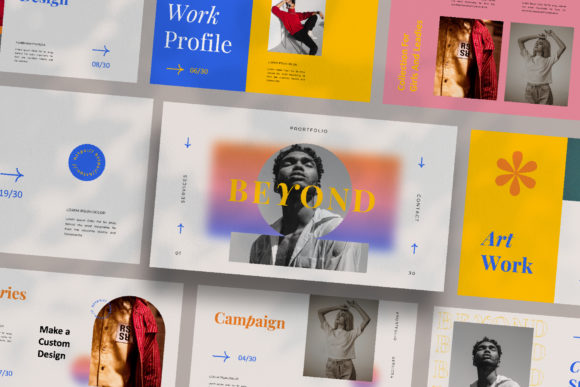
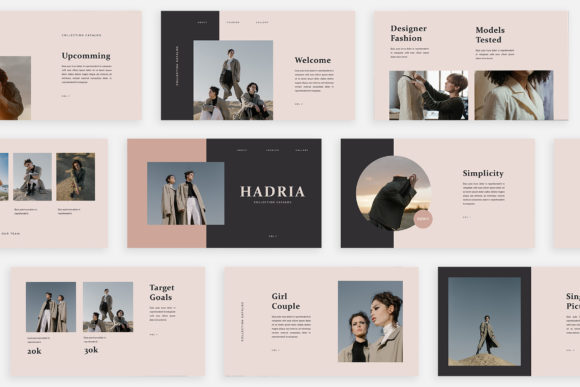
This template was built with a minimal yet ultra-modern aesthetic. Every slide reflects attention to detail, from the layout variations to the automatic color change feature. But beyond the looks, what really matters is how it works in real-life situations. Whether you’re a fashion entrepreneur launching a new collection, a freelancer putting together a portfolio, or a small business owner creating a digital catalog, this template can save you hours while making you look polished.
What Makes the Lookbook Keynote Template Stand Out
At its core, this is a Keynote file designed for product presentations and marketing. It comes in full HD resolution (1920×1080), so your images and text look crisp on screens of all sizes. The template uses Slide Master, meaning you can drag and drop your own images without breaking the layout. That’s a huge time-saver if you’re not a design expert—you don’t need to fiddle with alignment or spacing. The theme color changes automatically, which gives you flexibility to match your brand’s palette without extra work.
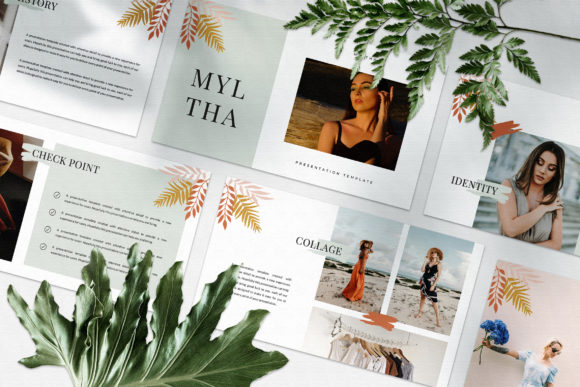
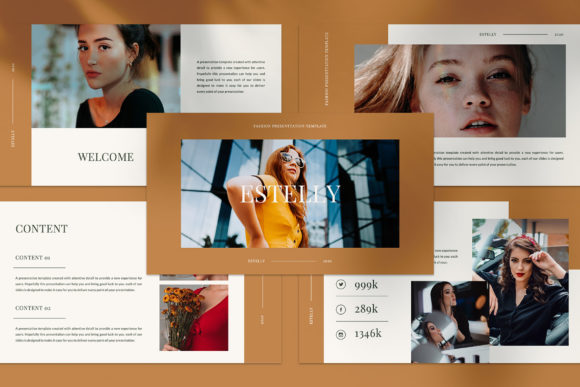
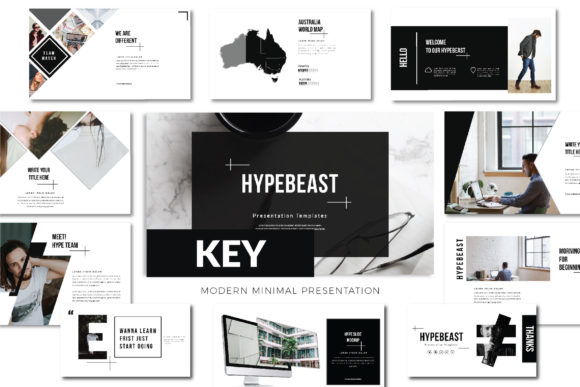
Another standout quality is the mix of layout options. You get lookbook-style spreads, magazine-style layouts, and variations that let you combine text and visuals in different ways. This isn’t a one-size-fits-all template; it’s more like a toolkit you can adapt for different content.
Real Situations Where This Template Shines
Let’s walk through some realistic scenarios. These are situations where people actually benefit from having a professional, easy-to-customize Keynote template.
1. Fashion Brands Launching a Seasonal Collection
Imagine you’re a fashion designer or brand manager preparing a lookbook for an upcoming season. You have dozens of product images, fabric swatches, and styling shots. You need a layout that lets the visuals breathe while still telling a cohesive story. The Lookbook Keynote Template’s magazine-style pages work perfectly here. You can feature a hero image on one slide, a grid of complementary pieces on the next, and add a short description without crowding the design.
Because the template includes device mockups and icon sets, you can also show how your collection might appear on a website or social media. That adds a layer of realism and helps buyers or retailers visualize the final product.
2. Entrepreneurs Pitching Their Business
For “girlboss” and “ladypreneur” types, presenting your brand to investors, partners, or at a networking event often requires more than a standard PowerPoint. You want to convey confidence, creativity, and attention to detail. Using a template with a unique, modern feel signals that you care about your brand’s presentation. The automatic color change means you can align the deck with your logo and website colors instantly, reinforcing brand recognition.
Whether you’re in fashion, beauty, wellness, or any lifestyle business, the template’s variety of text layouts lets you mix storytelling with data—like including a few slides for market research or customer testimonials without breaking the visual flow.
3. Freelancers and Creative Professionals Building Portfolios
If you’re a photographer, stylist, graphic designer, or illustrator, you need a portfolio that shows your best work without distraction. A cluttered template can take away from your images. The clean lines and ample white space in this Keynote template put your work front and center. You can easily add captions, project titles, or brief case studies using the provided text variations.
Because it’s fully editable, you can rearrange slides, add or remove sections, and even repurpose it for different clients. That’s a practical advantage when you’re pitching to a potential client and want to tailor your portfolio on the fly.
4. Marketing Teams Creating Product Catalogs
Product catalogs—whether digital PDFs or in-person presentations—require consistency across many pages. The Slide Master functionality means you set your fonts, colors, and image placements once, then all slides follow that template. You avoid the headache of manually adjusting each slide. The high-resolution output ensures that when you export to PDF or present on a large screen, your product shots remain sharp.
Teams can also collaborate easily because the file structure is straightforward. Even if someone is not a Keynote pro, they can drop in new images and update text without accidentally breaking the design.
5. Bloggers and Content Creators Preparing Media Kits
If you’re a blogger or influencer, media kits are essential for pitching to brands. A media kit is essentially a mini lookbook of your content, audience, and collaboration opportunities. The template’s magazine-inspired layouts help you present your statistics, social media metrics, and sample posts in a visually appealing way. You can create a multi-page media kit that feels premium without hiring a designer.
The included free font guide and help PDF make setup quick. Even if you’re not design-savvy, the instructions walk you through the necessary steps. That lowers the barrier for anyone who wants to look professional on a budget.
How Different Users Benefit in Different Situations
The beauty of a template like this is that it adapts to your specific needs. Here are some more ways various people might use it:
- Hobbyists creating a personal lookbook for a creative project, like a custom clothing line or an art series. The template makes it easy to document progress and share with friends, online communities, or at local markets.
- Educators and workshop facilitators teaching design, fashion, or business topics. The clean layouts help students focus on content rather than distracting backgrounds. You can also use it to present student work in a unified format.
- Small business owners promoting a new product line via email or social media. You can repurpose slides as Instagram carousels or embed them in a newsletter. The device mockups help show how a product looks in real life.
- Publishers and editors creating a digital preview of a forthcoming magazine issue or a portfolio of featured articles. The magazine-style layouts are specifically suited for editorial content.
- Event organizers preparing visual guides for fashion shows, pop-up shops, or trade booths. You can print slides as handouts or display them on screens during the event.
What to Consider Before Using This Template
While the Lookbook Keynote Template offers a lot of flexibility, it’s not a magic solution. Here are some practical things to think about before you download or purchase it.
Your Content Needs to Be High Quality
A good template elevates your content, but it can’t fix low-resolution images or poorly written text. Since the template is designed for high-res output, you should use images that are at least 1920×1080 pixels. If your photos are small or blurry, the full HD format will highlight those flaws. Take the time to prepare quality visuals—that will make the most of the template’s clean design.
Familiarity with Keynote Helps
The template is fully editable and easy to customize, but you’ll get the most out of it if you know basic Keynote functions like inserting images, editing text, and using Slide Master. The help PDF explains the free fonts and installation, but if you’re new to the software, budget a little time to learn. That said, the learning curve is gentle—even beginners can drag and drop.
Consider Your Final Output Format
Are you presenting live, exporting to PDF, or sharing online? The template works well for all of these, but you may need to adjust a few things. For example, if you intend to print your lookbook, make sure the color profile is set correctly. If you’re sharing as a PDF, use the high-resolution export options. The template’s HD resolution gives you flexibility, but always preview the final file on the intended device or print medium.
Color Changes Are Automatic, But Test Them
The automatic theme color change is a big time saver, but it works best if you stick to the template’s built-in palette. If you try to apply a completely custom color that isn’t part of the theme, some elements might not update uniformly. The help PDF likely explains this, but test a few slides after making changes to ensure consistency.
Connecting Features to Real Outcomes
Let’s link a few features directly to outcomes you’ll experience.
- Drag and drop images via Slide Master → you spend minutes instead of hours formatting each slide. That means you can focus on your message, not on alignment.
- Automatic color change → you maintain brand consistency without manually updating each element. That’s especially useful when you reuse the template for different projects.
- Variety of layouts → you can mix product shots, text-heavy slides, and graphic elements without the deck feeling repetitive. This keeps viewers engaged longer.
- Device mockups and icon set → you can show digital product contexts, making your presentation more relatable and modern. It adds credibility without extra design work.
- Free fonts with instructions → you avoid licensing issues and get a complete, professional look without additional costs. The help PDF makes installation easy.
Final Observations
The Lookbook Keynote Template is not just a one-off slide set. It’s a resource you can apply repeatedly across different projects—whether you’re a seasoned entrepreneur or someone just starting to build a portfolio. The key is to treat it as a foundation, not a crutch. Use your own compelling images and clear copy, and let the template frame them effectively.
In a world where first impressions often happen on a screen, having a polished visual presentation can set you apart. This template gives you a shortcut to that polish, but the real value comes from how you use it to tell your story. Whether it’s a fashion collection, a business pitch, or a creative portfolio, the template lets your content shine without getting in the way.