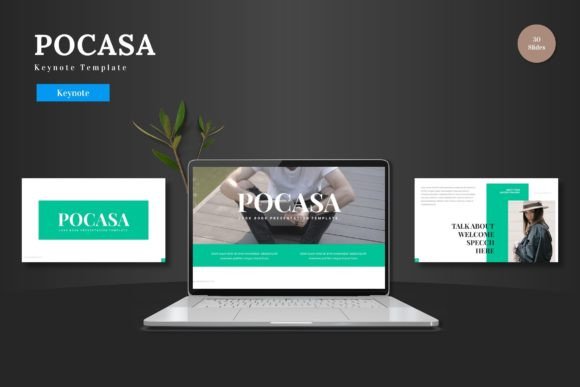
Pocasa Keynote Template: Build Cohesive Presentations Quickly
Putting together a presentation that feels polished and intentional often takes more time than the actual talk. You might have the content ready, but arranging slides, matching colors, and keeping a consistent look across every slide can turn into a project of its own. The Pocasa - Keynote Template aims to solve that by giving you a complete design system that works from the first slide to the last. Instead of starting from a blank canvas, you get a framework where each element already fits together.
What Makes a Template More Than a Decorative Layer
A good presentation template does more than just look attractive. It should help you communicate ideas clearly, guide the audience’s attention, and save you from repetitive formatting tasks. The Pocasa - Keynote Template is built around the idea that your slides should support your message without distracting from it. With 150 total slides spread across five premade color schemes, you have room to build narratives, showcase data, and present visuals without running out of layout options or feeling forced into a single look.
Each color scheme includes 30 slides, which means you can pick the palette that fits your brand, your topic, or your audience without having to manually recolor every graphic. That alone can cut down preparation time noticeably, especially if you present regularly and need to adapt the same core content to different contexts.
Practical Benefits of Having 150 Slides at Your Disposal
Having a large slide library is useful, but only if the slides actually serve different purposes. In this template, the variety is structured around real presentation needs. You get section break slides that help you signal transitions clearly, gallery and portfolio slides for visual showcases, and infographic-based layouts that turn data into understandable visuals. Whether you are walking through a quarterly report, pitching a creative project, or teaching a concept, the range of slides reduces the need to build custom layouts from scratch.
For someone who presents frequently, that means less time spent in design mode and more time refining the message. For someone who presents occasionally, it means you can produce a result that looks experienced and well-prepared without needing advanced design skills.
How Master Slides and Editable Graphics Improve Consistency
One of the stronger aspects of the Pocasa - Keynote Template is its reliance on master slides. When you base your presentation on master slides, changes you make to fonts, colors, or spacing apply across the entire deck automatically. That is especially helpful when you are working under a deadline and need to update a presentation after feedback. Instead of clicking through every slide and hoping nothing gets missed, you adjust the master slide, and the whole presentation reflects the change.
The graphics in this template are also pixel-perfect and fully resizable. That matters more than it might sound. If you need to enlarge a diagram or an icon to fill a slide, you are not limited by resolution issues. Every illustration stays sharp, and because they are editable, you can recolor them, reshape them, or combine them with other elements. That gives you control without demanding that you be a designer.
Picture Placeholders and Drag-and-Drop Workflow
Adding images to a presentation can sometimes cause layout problems. You drop a photo in, and suddenly text shifts, alignment breaks, or you have to spend time cropping and positioning. This template uses picture placeholders that are already sized and positioned within the slide layouts. You just drag and drop your image into the placeholder, and it fits automatically. That is a small feature, but it removes friction from the workflow. For bloggers, marketers, or educators who regularly swap out visuals for different audiences, this makes the template practical for repeated use.
If you ever need to create a portfolio or a gallery section, the dedicated slides for that purpose already have the structure in place. You add your images, and the layout keeps everything balanced. That is useful for freelancers, photographers, or small business owners who need to present work samples in a clean, professional format.
Who Benefits Most from This Type of Template
Different presentation templates serve different users well. The Pocasa - Keynote Template is particularly suited for professionals who need to present with confidence but do not have a design team behind them. Entrepreneurs pitching to investors, consultants reporting to clients, educators creating course materials, and marketers building campaign presentations all fall into that category. The template gives you a professional baseline, and because the layouts are modular, you can reuse them across multiple projects.
Bloggers and content creators who record video presentations or host webinars will also find value in having a consistent visual identity. When your slides look cohesive, your brand perception improves, and your audience can focus on what you are saying rather than wondering why the design changed between segments.
That said, if you are someone who needs highly unconventional layouts or very specific animated transitions, a template like this might feel restrictive. Templates work best when they provide a solid framework you can adapt, not when you need to break every rule. In those cases, comparing options or building custom slides might be a better fit. But for the vast majority of presentation needs, having a structured, well-tested set of slides is an advantage.
What the Main File Includes and How to Get Started
The main file contains five Keynote items, each with 30 slides, plus a folder with the five color schemes. Inside that folder, you will also find a Readme file with font and photo information. That detail is worth paying attention to, because using the intended fonts ensures your presentation looks exactly like the preview. If you substitute fonts, the spacing and visual balance may shift. The Readme gives you the information you need to replicate the look accurately.
Because everything is based on master slides and editable graphics, you do not need to learn new software skills to make changes. If you have used Keynote before, you will find the template intuitive. If you are newer to Keynote, the structure gives you a safety net, because the layouts are already well-designed, and you only need to replace placeholder content with your own.
Matching the Template to Your Presentation Style
Presentation design is not just about looking good. It is about making your audience understand and remember your message. When your slides are consistent, your audience can trust that the visual cues mean something. When your data is presented in clear infographics, your audience can grasp numbers quickly. When your images fit perfectly into placeholders, your presentation feels seamless rather than patched together.
The Pocasa - Keynote Template supports that by giving you a set of tools that work together. You can customize layouts, fonts, and colors without worrying that one change will break the rest of the deck. The handcrafted infographics and pixel-perfect illustrations give you a starting point that already communicates clearly. You just add your specific information.
If you present regularly or want your next presentation to feel more put together without spending hours in design mode, this template is worth considering. It respects your time, supports your creativity, and helps you deliver a message that your audience can follow comfortably from the first slide to the last.