BEVERLY – Retro Keynote Template: A Distinctive Approach to Modern Presentations
When you are preparing a presentation for a client pitch, a marketing campaign review, or an internal strategy meeting, the template you choose shapes not only how your content looks but also how your message lands. Many presentation templates rely on a single recurring layout repeated across slides, which can make even well-researched content feel monotonous. BEVERLY – Retro Keynote Template takes a different path. Instead of offering a handful of layouts that repeat, it provides slides that are each individually crafted, so your deck flows like a curated publication rather than a series of recycled frames.
This article examines what makes BEVERLY distinct, where it excels, where it may fall short, and how to decide whether it fits your specific project. The goal is to help you evaluate this template on its merits, compare it with other approaches, and choose the right tool for the presentation you need to deliver.
What BEVERLY – Retro Keynote Template Offers
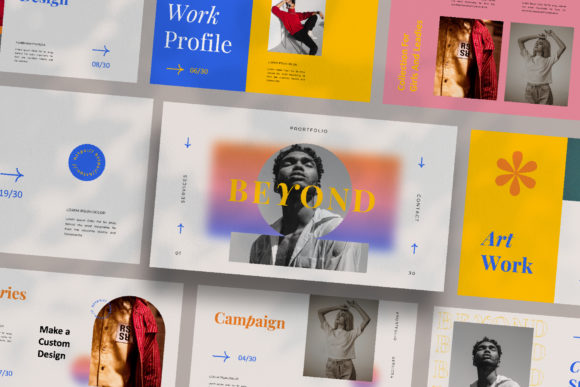
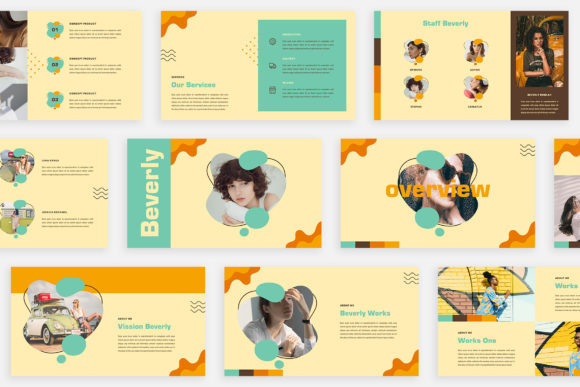
BEVERLY is a Keynote presentation template built around a retro-inspired aesthetic that leans into magazine and lookbook styling. Rather than offering a single master slide that you duplicate, each slide in BEVERLY is designed as a unique composition. This means your presentation can feel more like flipping through a well-designed editorial than clicking through a standard slideshow.
The template comes in Full HD resolution (1920 by 1080 pixels), which is the standard for most projectors, screens, and online sharing. It includes a unique theme colour feature that allows automatic colour changes across the deck, so you can adapt the palette to your brand or project without editing each slide individually. You also get multiple layout and text variations, which gives you flexibility even within a distinct visual style.
For users who value efficiency, BEVERLY is built with Slide Master functionality. You drag and drop your images into placeholders, and the formatting stays consistent. The template is fully editable, and the help instruction PDF includes links to the free fonts used, so you can match the original design without additional cost. Note that the photographs shown in the preview are not included — they are for illustration only, and you can source free images from Unsplash or Pexels.
How BEVERLY Compares with Typical Presentation Templates
Most presentation templates — whether for Keynote, PowerPoint, or Google Slides — follow a predictable structure. You get a title slide, a section divider, a few content layouts (bullet points, image left, image right, quote, and so on), and a closing slide. The user then repeats these layouts across a deck of 20, 30, or 50 slides. This approach works well for data-heavy presentations where consistency matters more than visual variety.
BEVERLY breaks from that pattern. Its slide-by-slide uniqueness means you are not repeating layouts. Each slide has its own arrangement of text, images, and negative space. This is closer to the approach used in magazine editorials or brand lookbooks, where every spread is designed to hold attention on its own terms.
The tradeoff is immediate. If you need a deck where every slide follows the exact same structure — for example, a quarterly financial report where each region gets identical treatment — BEVERLY may introduce more visual variation than is useful. But if your goal is to tell a story, showcase creative work, or present a brand narrative, the lack of repetition becomes a strength rather than a limitation.
Compared with minimalist templates that strip away design elements to focus on content, BEVERLY leans into design. It uses retro typography, distinctive colour palettes, and layout asymmetry. This is not a template that fades into the background. It makes a statement. For audiences in creative fields, marketing, or media, that statement can reinforce your message. For more conservative settings — legal or financial meetings, for instance — the same design may feel distracting.
Strengths and Best-Fit Situations
BEVERLY is particularly well suited for presentations where visual impact matters as much as the information itself. Here are some scenarios where the template shines:
- Marketing campaign presentations: When you are presenting a new campaign to a client or internal team, the lookbook style of BEVERLY allows you to present mockups, mood boards, and creative concepts in a way that feels polished and professional.
- Digital media and content strategy decks: If your presentation includes screenshots, social media visuals, or content examples, the varied layouts give each piece of media room to breathe.
- Brand identity and style guides: BEVERLY's retro aesthetic pairs naturally with brand presentations, especially if the brand itself has a vintage or artisanal feel.
- Personal projects and portfolios: Freelancers, designers, and photographers can use the template to create portfolio presentations that feel more curated than a standard slideshow.
- Pitch decks for creative businesses: Startups and agencies in design, fashion, media, or lifestyle sectors can use BEVERLY to differentiate themselves from the standard corporate deck.
The automatic colour change feature is a practical advantage. If you want to test how your presentation looks in different brand colours or seasonal palettes, you can do so without rebuilding slides. This is especially useful if you are repurposing the same deck for multiple clients or audiences.
Tradeoffs and Limitations to Consider
No template is universal, and BEVERLY has clear tradeoffs that you should weigh before committing.
Design repetition vs. design consistency. Because each slide is unique, your audience may not develop the same visual rhythm they would with a repetitive template. For some presentations, that rhythmic familiarity helps viewers focus on content rather than layout. With BEVERLY, each slide may require a moment of reorientation. This is not inherently bad, but it is a factor to consider for longer decks or for audiences who prefer a predictable format.
Learning curve for customization. While BEVERLY is built with Slide Master and drag-and-drop placeholders, the uniqueness of each slide means that making global changes is less straightforward than with a traditional template. If you decide to change the font across all slides, you may need to adjust each slide individually unless the font change is handled through the theme colour system. Similarly, if you want to impose a strict corporate layout (logo in the same corner on every slide), you may find yourself making manual edits.
File size and performance. High-resolution images and multiple unique layouts can increase the file size of your Keynote deck. If you are sharing the file via email or working on an older device, performance may be slower than with a simpler template.
Not ideal for data-heavy presentations. If your deck includes dense tables, complex charts, or detailed financial projections, BEVERLY's magazine-style layouts may not accommodate them comfortably. The template prioritizes visual storytelling over data display. For analytical decks, a more structured, data-friendly template would be a better fit.
When BEVERLY May Not Be the Right Choice
There are situations where a different approach is more appropriate. If your presentation will be viewed on a small screen, such as a phone or tablet, the intricate layouts and retro typography may not scale down well. Similarly, if you need to present in a highly regulated industry where slides must follow strict branding guidelines, the creative freedom of BEVERLY could conflict with compliance requirements.
Another scenario is when multiple people are collaborating on the same deck. Because BEVERLY relies on slide-by-slide uniqueness, collaborators may find it harder to maintain consistency if they are not all familiar with the template's structure. A more standardized template with fewer layout variations would be easier for a team to co-edit.
If your timeline is very short, the extra time needed to customize each slide — even with drag-and-drop — may be a factor. While BEVERLY is not difficult to use, it is not a one-click solution. You should plan time to select images, adjust text lengths to fit the layouts, and fine-tune the colour palette.
Decision Factors: Choosing Between BEVERLY and Other Approaches
When you are evaluating BEVERLY against other templates or presentation formats, consider the following factors:
- Audience expectations. What does your audience typically respond to? A creative audience will appreciate the editorial feel. A conservative audience may prefer a cleaner, more uniform design.
- Content type. Are you presenting images, mood boards, and short text? Or are you presenting data, long-form text, and complex diagrams? BEVERLY suits the former far more than the latter.
- Brand alignment. Does the retro aesthetic match your brand or the message you want to convey? If your brand is modern, minimalist, or corporate, the vintage look may create a disconnect.
- Time and resources. Do you have the time to customize each slide and source high-quality images? If not, a template with fewer layouts and simpler customization may be more practical.
- Distribution format. Will the deck be presented live, shared as a PDF, or uploaded to a platform like SlideShare? The varied layouts work well for linear presentation but may feel disjointed in a non-linear viewing experience.
Practical Examples of BEVERLY in Use
Imagine you are a marketing consultant preparing a brand strategy deck for a small fashion label. You want to show the client mood boards, competitor analysis, target audience profiles, and a proposed visual direction. Using BEVERLY, you can present each piece of the narrative on its own terms — a full-bleed image for the mood board, a split layout for the competitor comparison, and a text-focused slide for the audience profile. The deck feels more like a brand book than a slide deck, which can help the client envision the final brand identity.
Now consider a different scenario. You are a project manager at a construction firm presenting a quarterly update to stakeholders. You have cost tables, Gantt charts, and risk matrices. BEVERLY's layout would struggle to accommodate that content without heavy modification. In this case, a simpler template with consistent chart layouts and table formatting would serve you better.
These examples highlight the core decision point: BEVERLY is a tool for storytelling and visual impact, not for uniform data delivery. Choosing it means prioritising the aesthetic and narrative quality of your presentation over consistency and repeatability.
Making an Informed Choice
BEVERLY – Retro Keynote Template offers a genuine alternative to the standard presentation format. Its slide-by-slide uniqueness, magazine-inspired layouts, and retro aesthetic make it a strong candidate for creative presentations, marketing decks, and brand storytelling. At the same time, its tradeoffs in consistency, data handling, and collaboration mean it is not the right fit for every project.
Before you decide, review the content you need to present, the audience you are addressing, and the impression you want to leave. If your deck relies on visual variety and editorial design, BEVERLY is worth the investment. If your priority is uniformity, speed, or data clarity, a more traditional template may serve you better.
Ultimately, the best presentation tool is the one that helps your content connect with your audience. BEVERLY does that by offering a distinctive visual language that stands apart from the crowd. When used in the right context, it can make your presentation not just seen, but remembered.