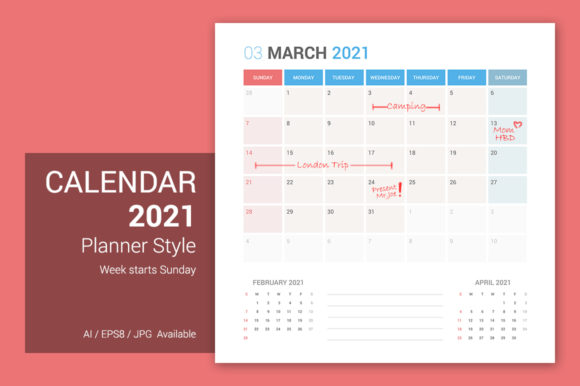
Calendar 2021 Planner Sunday Start: A Strategic Tool for Intentional Planning
Every planner begins with a choice about how you structure your time. The Calendar 2021 Planner Sunday Start offers a deliberate design that aligns with how many professionals and creatives actually think about their weeks. Starting the week on Sunday rather than Monday may seem like a small detail, but it can shift how you anticipate, prioritize, and review your commitments. This article unpacks the strategic value of this specific planner format, its production-ready design specifications, and how to use it not as a passive calendar but as an active decision-making instrument.
Why a Sunday Start Calendar Matters for Goal Execution
For many entrepreneurs, freelancers, and small business owners, the week does not begin neatly on a Monday morning. Preparations for the upcoming week often start on Sunday evening—reviewing tasks, setting priorities, and mentally positioning yourself for what lies ahead. A Calendar 2021 Planner Sunday Start naturally accommodates that rhythm. It gives you a full weekend view before the workweek begins, allowing you to map out goals, allocate time blocks, and identify potential friction points before Monday arrives.
From a strategic perspective, starting the week on Sunday supports a preparation-first mindset. Instead of reacting to Monday’s demands, you step into the week already oriented. This is particularly valuable for marketers planning content drops, educators scheduling course modules, and decision-makers who need to communicate clear expectations to their teams. The Sunday start becomes a structural anchor for proactive rather than reactive planning.
Design Specifications That Enable Precision and Flexibility
The Calendar 2021 Planner Design in question goes beyond a simple grid. It is built as a square layout measuring 6250x6250 pixels, which translates to 53x53 cm at 300 DPI. This creates a 21x21 grid structure that lends itself to both digital and print use. The square shape is not arbitrary—it provides balanced real estate for detailed entries, visual planning, and even branding overlays. Because the file dimensions are large, you can print at poster scale or use the digital version for high-resolution screen presentation.
The package includes twelve separate monthly files, each designed with the Sunday start. Critically, each monthly file also includes the previous month and the next month as reference calendars. This design choice eliminates the need to flip between files or guess adjacent dates. It supports long-term planning by keeping the context of the surrounding months visible, which is especially useful when scheduling projects that span multiple weeks or require lead time for preparation.
File Formats and Editability
Multiple file formats are included: AI (Adobe Illustrator), EPS (Encapsulated PostScript), and JPG (high-resolution). This ensures compatibility across different workflows. Designers and publishers can open the AI file to customize colors, fonts, or add branding elements. The EPS format offers a vector fallback for users who need compatibility with other software. The JPG version is ready for immediate sharing or printing without any software dependencies.
The AI file is fully editable, and the font used throughout is the Roboto Family. Roboto was chosen for its clarity across both print and digital mediums—its geometric shapes and open forms maintain legibility even when scaled down on a monthly grid. If you need to localize the calendar or adapt it for a specific brand, you can modify text elements, adjust typography weights, or swap in your own fonts without breaking the layout. This level of editability is essential for creators who need to produce multiple versions or iterate on their planning tools over time.
Strategic Use Cases Across Different Roles
The Calendar 2021 Planner Sunday Start is not a one-size-fits-all product but a foundation you tailor to your context. Below are several realistic use cases that demonstrate its strategic value.
For Entrepreneurs and Small Business Owners
If you run a business, your week is rarely confined to Monday through Friday. Client meetings, product launches, and operational reviews often spill into weekends. Using a Sunday start calendar lets you treat the weekend as a contiguous block for high-focus work while keeping weekdays for client-facing tasks. You can assign Sunday as a planning day, Monday through Thursday as execution days, and Friday as a review and wrap-up day. The inclusion of previous and next month reference dates helps you track recurring billing cycles, campaign end dates, and seasonal trends without cross-referencing separate documents.
For Marketers and Content Creators
Content calendars require alignment with publication schedules, social media algorithms, and audience behavior patterns. A Sunday start gives you visibility into the entire week’s content pipeline before Monday traffic spikes. You can schedule posts, email newsletters, and ad launches knowing exactly where each piece falls relative to the weekend. The square format’s large cell size allows you to add notes on platform-specific posting times, deadlines, and asset completion status. The AI file becomes a living document you update each month without rebuilding from scratch.
For Educators and Freelancers
Freelancers juggling multiple clients will appreciate the ability to color-code project phases within each monthly grid. The previous month reference is especially helpful when a project started on a Tuesday of the prior week—you can see the full scope without guessing. Educators can use the calendar to map lesson plans, assignment due dates, and exam schedules across semesters. The Sunday start allows them to preview the next week’s teaching load on Sunday evening, adjusting for holidays or school events visible in the adjacent month preview.
For Publishers and Bloggers
If you run a blog or a publishing schedule, the Calendar 2021 Planner Design becomes a production roadmap. You can assign each row to a different content category and use the cells to track drafts, edits, design reviews, and publication dates. The 21x21 grid structure gives you 21 rows and 21 columns—more than enough to represent weeks across a month with extra space for notes. Because the file is fully editable, you can export weekly views as separate JPGs for team sharing without losing the master layout.
Practical Planning Tips for Maximum Effectiveness
Owning a well-designed calendar file is only half the equation. How you use it determines its impact on your productivity and decision-making. Below are strategic observations based on working with Sunday start planners.
- Use the previous month reference to identify handoffs. When a task or project carries over from the last week of the previous month, mark it clearly in the current month’s grid. This prevents forgetting commitments that span month boundaries.
- Block your Sunday planning session as a recurring event. Treat it as non-negotiable time. Even 30 minutes reviewing the upcoming week can reduce decision fatigue and improve focus.
- Take advantage of the AI file’s editability to create templates. For example, save a base version with your recurring weekly tasks, then duplicate it each month. Adjust only the variables such as deadlines, meetings, and deliverables.
- Print the JPG version for physical planning if digital tools feel cluttered. The high resolution (6250x6250) ensures clean print at 53x53 cm. Pin it on a wall or place it on a desk for at-a-glance orientation.
- Color coding with layers in the AI file. Use separate layers for personal tasks, professional obligations, and long-term projects. Toggle visibility as needed.
What to Consider Before Relying on This Calendar
No tool, no matter how well-designed, guarantees results without intentional use. The Calendar 2021 Planner Sunday Start can become a source of stress rather than clarity if approached without clear goals. Here are potential risks and how to mitigate them.
Risk of over-filling the grid: The large square cells may tempt you to cram in every minor task. This leads to visual noise and reduces the calendar’s ability to show strategic priorities. Instead, limit entries to key commitments, deadlines, and milestones. Use a secondary digital tool for granular to-dos.
Risk of treating the Sunday start as a rigid schedule: Not every week must begin with a Sunday planning session. If your workflow naturally starts on a different day, adapt the calendar to your rhythm rather than forcing your rhythm into the calendar. The file’s editability allows you to reorder the grid if needed, but the Sunday start is baked into the design. If Monday start is essential for your team, this specific product may not fit without significant modification.
Risk of ignoring the adjacent month references: The inclusion of previous and next month calendars is a feature, not decoration. If you never look at them, you lose context that could prevent double-booking or missed handoffs. Make it a habit to glance at the adjacent months each time you update a monthly file.
Risk of format lock-in: The AI and EPS files are most useful for those comfortable with vector editing. If you lack the software or skills, the JPG version is fully functional but loses editability. Consider whether you need the editable format or if a static PDF would suffice. For most strategic use cases, JPG quality is sufficient for printing and reference.
How to Approach This Calendar Intentionally
The difference between a passive calendar and a strategic planner is how you interact with it. Here is a decision-making framework for using the Calendar 2021 Planner Sunday Start with purpose.
Start with your goals for the year, not the month. Before opening any monthly file, list your top three objectives for the year. Then decompose them into quarterly milestones. Then monthly actions. The calendar becomes a visual representation of those actions. Every time you fill in a cell, ask yourself: Does this move me toward my goal?
Use the previous month reference to close loops. At the end of each month, review the previous month’s undone tasks. Decide if they roll over to the next month or if they should be dropped. This prevents accumulation of unfinished work across the year.
Create a weekly review routine using the adjacent month. On the last Sunday of each month, open the next month’s file and scan the upcoming weeks. Identify any conflicts, gaps, or opportunities you can address before the month begins. This forward-looking habit reduces surprises.
Customize the design to reflect your priorities. Because the AI file supports full editing, you can change the Roboto font weights for headers, adjust cell sizes, or add icons. For example, make weekends slightly shaded to reduce visual emphasis on non-work days. Add a column for notes on the right side. The design is a starting point, not a fixed template.
Long-Term Value Across Multiple Years
While this product is specifically for 2021, the structural decisions embedded in its design—Sunday start, square grid, large dimensions, adjacent month references, and editable vector files—are timeless. If you are using a 2021 calendar for historic planning, archival purposes, or as a template for future years, the strategic principles still apply. You can repurpose the AI file by updating the year numbers and retaining the layout. This makes it a long-term asset rather than a single-use download.
For professionals who plan across multiple years, having a consistent format reduces cognitive load. You know exactly where to look for a given month, how to read the week structure, and where the context months are placed. That consistency matters more than the specific year on the cover.
Final Strategic Observations
The Calendar 2021 Planner Sunday Start and its accompanying Calendar 2021 Planner Design offer more than just a way to track dates. They provide a structure that, when used thoughtfully, can enhance your planning discipline, reduce the friction of week transitions, and give you a reliable framework for decision-making. The Sunday start is not a whim—it reflects how many successful professionals mentally organize their time. The square, high-resolution file gives you room to think in spatial terms rather than cramped rows. The editability ensures the tool adapts to you, not the other way around.
The risk is not in using such a calendar, but in using it without intention. If you fill in dates reactively and never review the adjacent months, you are merely decorating a grid. If you treat the AI file as a static PDF, you lose the strategic advantage of customization. Approach this calendar as a living system that you actively shape and revisit. Let the Sunday start remind you to prepare before the storm of the week arrives. Let the 21x21 grid give you clarity amid complexity. And let the multiple formats free you to work in whatever medium suits your workflow best.
In a world where planning tools are abundant but genuine strategic support is rare, a well-considered calendar remains one of the most underrated productivity assets. The Calendar 2021 Planner Sunday Start is one such tool—ready to be adapted, respected, and put to work for your goals.