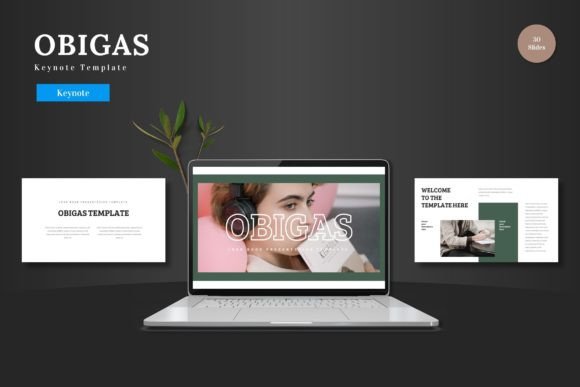
Evaluating the Obigas Keynote Template for Professional Presentations
When you need to build a presentation that communicates clearly and leaves a strong impression, the template you choose can make a significant difference. The Obigas Keynote Template positions itself as a versatile option for business pitches, e-commerce showcases, and product promotions. But like any tool, its value depends on how well it aligns with your specific project needs. This article walks through what this template offers, where it shines, where it may fall short, and how to decide if it is the right fit for your next presentation.
What the Obigas Keynote Template Brings to Your Workflow
The Obigas Keynote Template is a presentation package designed exclusively for Apple Keynote. It includes 150 total slides spread across five pre-made color schemes, with 30 slides per scheme. The structure includes section break slides, infographic layouts, gallery and portfolio pages, and drag-and-drop picture placeholders. All elements are built using Master Slides, meaning you can make changes globally without editing each slide individually.
One of the more practical aspects is that everything is editable directly within Keynote. You do not need additional software to adjust colors, resize graphics, or swap out images. The template also includes animated slide transitions, which can add a polished feel when presenting live or sharing a self-running deck.
For someone who regularly builds presentations and values consistency, having a large slide library with built-in color variations can save hours of formatting time. Instead of starting from a blank canvas, you drop your content into pre-structured layouts and adjust the styling to match your brand or message.
How This Template Compares With Other Presentation Approaches
Presentation templates generally fall into a few categories. Some are minimal and text-focused, ideal for dense data or academic settings. Others are heavily graphical, suited for brand storytelling or creative portfolios. The Obigas Keynote Template sits somewhere in the middle. It offers enough visual structure to guide the viewer's eye while leaving room for custom content.
Compared to building a presentation entirely from scratch, using a template like this can reduce decision fatigue. You are not worrying about font pairings, color balance, or layout options at every step. The framework is already tested. That said, templates are not always flexible enough for highly custom or unconventional presentations. If your content demands a very specific visual narrative that breaks a standard slide structure, you may find yourself fighting the template rather than working with it.
Another consideration is software dependency. Because this template is built for Keynote, it will not open natively in PowerPoint, Google Slides, or other platforms. If you collaborate with people who use different tools, you may need to export or convert files, which can sometimes shift layout or break animations. This is not a flaw of the template itself, but it is a practical constraint worth noting.
Strengths of the Obigas Keynote Template
The most immediate strength is the sheer number of slides. With 150 slides across five color schemes, you have a wide vocabulary of layouts to draw from. This is especially helpful if you are building a longer deck, such as a detailed pitch deck or a product catalog, where you need variety to maintain audience attention.
The inclusion of infographic slides is another practical advantage. Data-heavy presentations often suffer from poorly designed charts or text-heavy tables. Having handcrafted infographic layouts means you can present statistics, comparisons, and timelines in a way that is easier to digest. The pixel-perfect illustrations also mean you are not dealing with blurry or misaligned graphics when scaling them up on larger screens.
Drag-and-drop picture placeholders are a small feature that saves real time. Instead of resizing and cropping every image manually, you simply drop your photo into the placeholder, and it fits automatically. This is especially useful when you are working with multiple images, such as in a portfolio or gallery section.
Another strength is the use of Master Slides. If you need to change the color scheme or adjust a recurring element across the entire deck, you can do so in one place. This keeps the presentation consistent and reduces the risk of missing a slide during edits.
Tradeoffs and Limitations to Consider
No template is a perfect fit for every situation, and the Obigas Keynote Template has its own set of tradeoffs. One of the most obvious is that it is a Keynote-only product. If you or your team primarily use PowerPoint or web-based tools, this template will not integrate directly into your existing workflow. You can export as a PDF or PowerPoint file, but some animations and layering may not transfer cleanly.
Another consideration is the level of customization. While all elements are editable, heavily branded decks may still require significant rework. If your company uses specific fonts, color palettes, or visual guidelines that differ from what the template offers, you will need to invest time in adjustments. The template includes five color schemes, but if none of them match your brand, you will need to customize extensively.
There is also the question of originality. Because templates are distributed to many users, your presentation might share visual DNA with others who use the same product. If uniqueness is critical for your brand or pitch, you may want to combine the template with custom elements, such as original photography, unique illustrations, or tailored typography.
Finally, consider the learning curve for Master Slides. If you are not familiar with how Keynote handles master layouts, you may need a few minutes to understand how to apply changes globally versus locally. The included readme file helps with this, but it is not a full tutorial.
When This Template Is the Right Choice
The Obigas Keynote Template works well in scenarios where you need a professional deck on a reasonable timeline and you value structure and consistency. It is a strong candidate for business pitches where you want to present data clearly and maintain a clean visual flow. The infographic slides are especially helpful if you need to explain processes, growth metrics, or market comparisons.
For e-commerce or product promotion decks, the gallery and portfolio slides make it easy to showcase products visually. The drag-and-drop placeholders speed up the process of adding product shots, and the animated transitions can help maintain engagement during a live sales presentation.
It is also a practical choice for internal presentations where the audience is familiar with the content but you want to present it in a structured, easy-to-follow format. Training materials, annual reviews, or department updates can benefit from the consistent layouts without requiring heavy design work.
For users who work exclusively in Keynote and want a template that feels complete out of the box, this product offers a lot of value. The variety of slides means you are unlikely to run out of layout options, and the color variations give you flexibility without starting from zero.
When You May Want to Look at Other Options
If your presentation relies heavily on custom animations, interactive elements, or non-standard slide structures, a template might feel restrictive. In those cases, building from scratch or using a more modular template approach might give you more freedom.
If you collaborate with people who use different presentation software, you will need to account for file compatibility. A PowerPoint-native template or a web-based tool like Google Slides might be a better fit for cross-platform teams.
For very short presentations, such as a five-slide lightning talk or a quick status update, the 150-slide library may be more than you need. In those cases, a smaller, more focused template might be easier to work with.
If brand uniqueness is a top priority, consider whether the template style aligns with your visual identity. The look is clean and colorful, but it has a distinct style that may or may not match your brand tone. A custom-built deck or a minimalist template with fewer predefined design elements might be easier to adapt to strict brand guidelines.
Key Decision Factors When Choosing a Presentation Template
When evaluating any template, including the Obigas Keynote Template, consider the following factors:
- Software compatibility: Does the template work with the tool you and your team use? If you are a Keynote user, this is a direct fit. If not, you will need to account for conversion.
- Slide variety: Do you need many different layouts, or will a smaller set suffice? Longer decks benefit from variety, while shorter decks may not need it.
- Customization effort: How much time are you willing to spend adapting the template to your brand or content? Templates save time, but they are not zero-effort.
- Visual style: Does the design match the tone of your content? A colorful, modern style works for pitches and product launches but may not suit more conservative or academic contexts.
- Animation and interactivity: Do you want animated transitions? Some templates include them, while others are static. The Obigas Keynote Template includes animations, but you can also disable them if needed.
Practical Advice for Getting the Most Out of This Template
If you decide to go with the Obigas Keynote Template, here are a few practical tips:
- Start by reviewing all five color schemes before you begin building. Pick the one closest to your brand or preferred mood. This reduces the amount of re-coloring later.
- Use Master Slides to set global fonts and colors early. This ensures consistency across all slides and makes later edits faster.
- Replace placeholder images with your own high-resolution photos. The template is designed to make this easy, so take advantage of it.
- Test the animated transitions on the device you will present from. What looks smooth on one device may behave differently on another.
- Keep the readme file handy. It includes information about fonts and photo credits, which is useful if you need to purchase or download specific typefaces.
Final Thoughts on the Obigas Keynote Template
The Obigas Keynote Template is a well-structured, feature-rich option for anyone who uses Apple Keynote and needs a professional presentation deck. With 150 slides, five color variations, and editable graphics, it offers a practical balance between flexibility and convenience. For business pitches, product showcases, and portfolio presentations, it can significantly reduce the time you spend on formatting and layout.
At the same time, it is not a one-size-fits-all solution. Software exclusivity, customization requirements, and brand fit are all factors that should influence your decision. By weighing these considerations against your specific project needs, you can make a more informed choice about whether this template is the right fit for your next presentation.