Hadria Keynote Template: A Practical Evaluation for Digital Presentations
When preparing a professional presentation, the choice of template often determines how effectively your content resonates with an audience. The Hadria Keynote Template is one such option that has drawn attention for its distinctive approach to slide design. Rather than offering a set of repetitive layouts with minor variations, this template provides 30 uniquely crafted slides, each with its own structure and visual identity. This article offers a balanced evaluation of the Hadria Keynote Template, exploring its features, practical benefits, tradeoffs, and the scenarios where it may or may not be the right fit for your project.
What Is the Hadria Keynote Template?
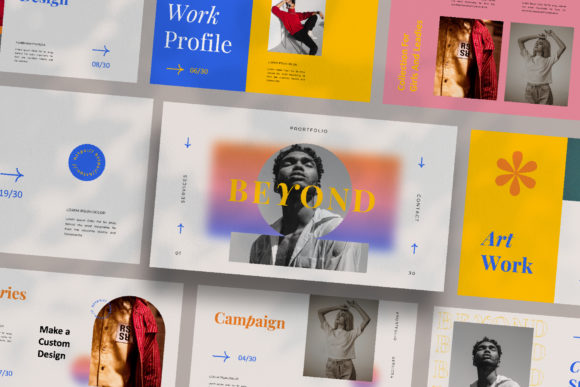
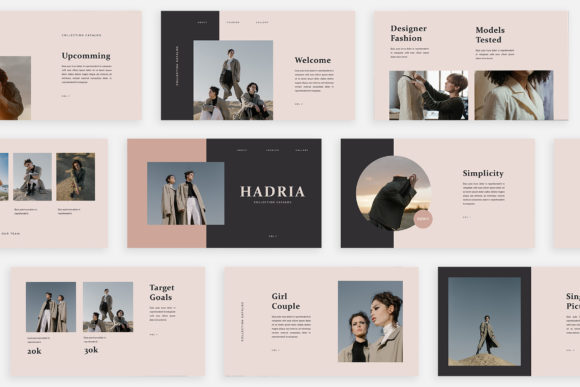
The Hadria Keynote Template is a presentation framework designed for Apple Keynote, comprising 30 individual slides. Each slide is built as a distinct layout rather than a recurring theme with minor adjustments. This means that users receive a collection of slides where the arrangement of text, images, and graphic elements changes from one slide to the next, offering variety throughout a presentation. The template is optimised for Full HD resolution at 1920x1080 pixels and includes an automatic colour change feature based on a unique theme colour palette. It also adopts a lookbook and magazine-style layout approach, which can be particularly useful for visually rich content.
The template is built with Slide Master functionality, allowing users to drag and drop images into predefined placeholders. It is fully editable, and the free fonts used are linked within a help instruction PDF. It is important to note that photographs shown in previews are for illustration only and are not included with the template.
Who Might Be Interested in This Template?
Professionals and creatives who regularly prepare presentations for digital media, marketing campaigns, or client-facing projects may find the Hadria template worth considering. It is also relevant for individuals working on personal branding or portfolio presentations where visual distinction matters. Because each slide is unique, the template is especially appealing to those who want to avoid the monotony of repeated layouts and who value a curated, editorial aesthetic.
That said, not every presentation benefits from high slide variety. If you are preparing a data-heavy report or a consistent training module where uniformity supports comprehension, a template with repetitive layouts may be more appropriate. The key is to match the template's strengths to your specific communication goals.
Key Features and What They Mean in Practice
Understanding what each feature offers in real-world use is essential for making an informed decision. Below is a breakdown of the main characteristics of the Hadria Keynote Template.
30 Unique Slides
Unlike many templates that reuse the same layout across multiple slides with only colour or text changes, Hadria provides 30 slides that are structurally distinct. This can be beneficial for presentations that need to maintain audience engagement through visual novelty. However, it also means that you cannot rely on a single master layout to carry your content. Each slide may require individual attention when customising, which could increase preparation time.
Full HD Resolution
The 1920x1080 pixel resolution ensures that slides display clearly on modern screens and projectors. This is a standard resolution for most displays, so you can expect consistent quality across devices. If you require ultra-high resolution for large format displays or print, you may need to verify that the template scales appropriately, though standard Full HD is sufficient for the vast majority of digital presentations.
Automatic Colour Change
The template includes a theme colour that can be changed automatically, affecting multiple slide elements at once. This is a useful time-saver when you need to adapt the presentation to a brand palette or a specific visual tone. The automatic colour change works well if you stay within the template's intended colour architecture, but extensive customisation may require manual adjustments on individual slides.
Lookbook and Magazine Style Layout
These layouts emphasise large imagery, clean typography, and asymmetric arrangements. They are well suited for portfolios, mood boards, case studies, and marketing pitches where visual impact is a priority. If your content is primarily text-heavy or data-driven, the magazine style may not serve your needs as effectively, and you might find yourself adapting slides more heavily.
Slide Master and Drag-and-Drop Image Placeholders
The Slide Master function allows you to make global changes to fonts, colours, and spacing, while drag-and-drop placeholders simplify image insertion. This combination offers a reasonable balance between efficiency and flexibility. The learning curve is minimal for anyone familiar with Keynote, though users new to the software may need to consult the help PDF to get the most out of these features.
Free Fonts and Help Instruction PDF
The template uses free fonts, with links provided in the instruction document. This eliminates additional licensing costs, but you will need to download and install the fonts before editing. The instruction PDF also offers guidance on customisation, which is helpful but may not cover every scenario you encounter.
Benefits of Using the Hadria Keynote Template
The primary advantage of this template is its visual variety. Because each slide has a distinct layout, your presentation can feel more like a curated publication than a standard slideshow. This can be especially valuable when presenting to creative clients, marketing stakeholders, or at events where design quality reflects on your brand or credibility.
The magazine-inspired aesthetic also lends itself well to storytelling. If your presentation relies on narrative flow, the changing layouts can help signal transitions between sections or ideas without needing additional visual cues. The template supports both portrait and landscape image orientations through its varied placeholders, which gives you flexibility when selecting visuals.
Another benefit is the automatic colour change feature. If you need to adapt the same deck for different clients or internal teams, you can quickly shift the colour scheme without editing each slide individually. This can save significant time when repurposing content.
Tradeoffs and Considerations
While the Hadria template offers clear strengths, it also comes with tradeoffs that are worth considering before purchase. The most notable is the lack of uniformity. If your presentation requires a consistent layout across many slides, such as a financial report or an academic lecture, the varying designs may distract rather than enhance. In such cases, a template with a cohesive, repeating structure would be more practical.
Customisation effort is another factor. Because each slide is unique, you cannot simply paste content into a single master slide and have it appear consistently throughout. You will need to adjust text, images, and spacing on each slide individually. For users with limited time or design experience, this could be a drawback.
The template does not include the photographs shown in previews. This is standard practice, but it means you must source your own high-quality images to achieve the lookbook effect. If you do not have access to professional photography or stock image subscriptions, the final result may not match the previews as closely as you might hope.
Additionally, the template is designed specifically for Apple Keynote. If you or your team use Microsoft PowerPoint or Google Slides, you would need to convert the file, which may cause formatting issues. Always verify compatibility with your workflow before committing.
When Is the Hadria Keynote Template a Strong Fit?
The template is particularly well suited for the following scenarios:
- Marketing and advertising presentations where visual creativity supports persuasive messaging.
- Portfolio reviews for designers, photographers, or creative agencies that need to showcase work in an editorial format.
- Client pitches where a polished, magazine-like presentation can differentiate you from competitors.
- Digital media content intended for social sharing or online viewing, where visual impact drives engagement.
- Internal brand showcases or company culture decks that rely on imagery and storytelling rather than dense data.
If your content is visually driven and your audience values design distinctiveness, the Hadria template can help you deliver a memorable presentation.
When Alternatives May Be Worth Considering
There are situations where a different type of template may serve you better:
- Data-heavy presentations such as quarterly reports, research findings, or technical documentation. These benefit from consistent layouts that help audiences compare information across slides.
- Team-based projects where multiple people contribute slides. Uniform templates reduce formatting conflicts and streamline collaboration.
- Long presentations with 30 or more slides. The uniqueness of each slide may become overwhelming to edit at scale, and a template with fewer layout variations could be more efficient.
- Budget-constrained projects where you cannot invest time in customising each slide individually. A simpler template with fewer design elements may allow faster production.
- Cross-platform workflows where the presentation must be edited in both Keynote and PowerPoint. Templates designed for a single platform often lose formatting during conversion.
In these cases, look for templates that prioritise consistency, ease of editing, and cross-platform compatibility over visual variety.
Practical Decision-Making Insights
To determine whether the Hadria Keynote Template aligns with your goals, start by assessing your content type and audience expectations. If your slides will be viewed primarily on screens and your material is visually rich, the template's unique layouts and magazine style are likely to add value. If your content is text-dominated or your audience expects straightforward information delivery, a more conventional template may be a safer choice.
Consider also your available time and design confidence. If you are comfortable editing individual slides and have access to high-quality images, the template offers considerable creative freedom. If you prefer a "set and forget" approach where content flows into a fixed structure, you may find the level of required customisation burdensome.
Finally, think about the impression you want to leave. A presentation that looks like a curated publication can signal professionalism and attention to detail. However, that effect depends on your ability to populate the slides with content that matches the template's aesthetic. If your images or graphics are inconsistent in quality or style, the final result may feel disjointed.
Final Considerations
The Hadria Keynote Template offers a distinctive approach to presentation design by providing 30 unique slides with a lookbook and magazine-style layout. Its strengths lie in visual variety, automatic colour adjustment, and editorial aesthetics, making it a strong candidate for marketing, creative, and digital media presentations. Its tradeoffs include higher customisation effort, limited uniformity, and dependency on Keynote software.
When evaluating this template, focus on how well its characteristics match your specific presentation needs. A template that excels in one context may underperform in another. By considering your content type, audience, workflow, and available resources, you can make a practical decision that supports your communication objectives. The Hadria Keynote Template is not a one-size-fits-all solution, but for the right project, it can be a tool that elevates your message through intentional design.