MYLTHA – Google Slides Template: A Minimal Media Presentation Tool for Modern Storytelling
Presentations are everywhere. You see them in boardrooms, at conferences, in online webinars, and even in casual team meetings. But not all presentations are created equal. Some land with impact, while others fade into the background. The difference often comes down to how the story is framed visually. That is where MYLTHA – Google Slides Template steps in. It is not just another slide deck. It is a minimal media presentation template built for people who want to communicate clearly, elegantly, and memorably.
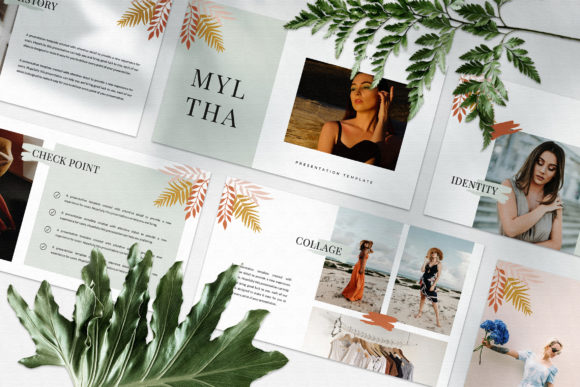
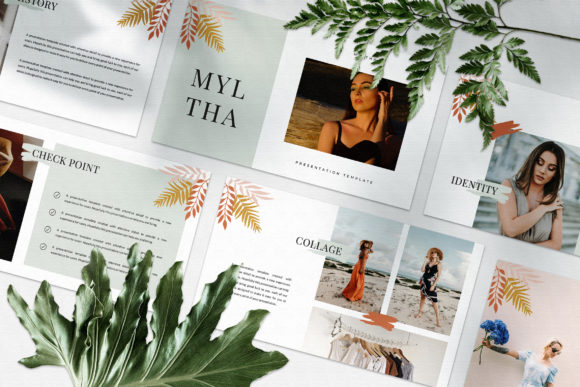
If you have ever spent hours tweaking slide layouts, fighting with alignment, or trying to make content fit a rigid structure, you already know the pain. MYLTHA is designed to remove that friction. It gives you a flexible canvas where each slide feels distinct, not repetitive. There is no generic placeholder look here. Instead, you get a collection of layouts that feel like they belong in a lookbook or a magazine. That makes it a natural fit for digital media work, marketing campaigns, and client-facing presentations where first impressions truly matter.
A template that feels like a toolkit, not a cage
One of the first things you notice about MYLTHA is that it does not force you into a single template mold. Every slide has its own personality. Some are image-heavy, others lean into typography, and some give you room to mix both. The result is a presentation that breathes. It does not feel like a slide deck someone assembled in a hurry. It feels curated.
This matters more than you might think. In real-world settings, people often judge the credibility of a proposal or idea based on how it is presented. If your slides look repetitive or dated, the audience might unconsciously assume the content is also stale. MYLTHA sidesteps that problem entirely because the variety is baked into the design itself. Whether you are pitching a new product, walking through a marketing strategy, or presenting research findings, the template helps you look polished without requiring design skills.
Where MYLTHA shines in real-world situations
The beauty of this template is that it works across many scenarios. Consider a marketing agency preparing a pitch for a potential client. The agency needs to communicate creative ideas, show campaign mockups, and present data in a way that feels fresh. MYLTHA gives them a layout that looks like a portfolio. It is clean, visual, and modern. The magazine-style spreads allow for hero images and bold text placements, making the pitch feel more like a story than a report.
Or think about an entrepreneur preparing a funding deck. Investors see dozens of presentations every month. The ones that stand out usually have a strong visual narrative. MYLTHA helps you build that narrative without needing a designer on retainer. The slides are structured to guide the eye naturally. You can drop in your product photos, your growth charts, your mission statement, and it all flows together without clashing.
For internal use, MYLTHA is just as useful. A team lead putting together a quarterly review can use the clean layouts to highlight key metrics. A nonprofit organization sharing impact stories can rely on the image-forward slides to make emotional connections. Even educators and trainers can use it to create course materials that feel less like old-school slides and more like modern learning content.
Who benefits the most from this approach
The audience for MYLTHA is fairly broad, but there are a few groups that get particularly strong value from it. Digital media professionals, for instance, often need to present visual-heavy content. Whether it is a social media strategy or a video campaign breakdown, the template supports that kind of work well. Marketing managers who regularly present to stakeholders also find the template useful because it helps them move quickly from idea to polished deck without friction.
Freelancers and independent consultants are another group that benefits. When you work solo, you do not always have access to a design team. Having a template like MYLTHA means you can show up looking professional even when you are a team of one. The same goes for small business owners who wear many hats. You can put together a product launch presentation, a partnership proposal, or even a internal training deck using the same tool, just by swapping out images and text.
There is also a strong fit for creatives. Photographers, designers, and videographers often need to present portfolios or mood boards. The lookbook-inspired layouts in MYLTHA give them a canvas that complements their work rather than competing with it. The minimal aesthetic keeps the focus on the visuals, which is exactly what you want when showcasing creative projects.
Practical strengths that matter in daily use
Beyond the visual appeal, MYLTHA comes with features that make it practical for everyday work. It is a PPTX file, so it works across platforms. The resolution is 1920x1080 pixels, which means it looks sharp on both screens and projectors. There is also a unique theme color system that allows automatic color changes. That is a huge timesaver if you need to adapt the deck to match a brand palette or client guidelines.
The variety of layouts and text options means you are never stuck with a slide that does not quite work for your content. You can choose a layout that emphasizes an image, one that focuses on a quote, or one that balances text and visuals. The Slidemaster functionality makes it easy to drag and drop your images. You do not need to be a PowerPoint or Google Slides expert to make it look good.
Another practical point is that the template uses free fonts. The instructions are included in a help PDF, so you can set it up quickly without hunting for resources. That also means you are not locked into expensive typefaces. If you need to share the deck with collaborators, everyone can access the fonts without licensing headaches.
What to consider before choosing this template
No template is perfect for every situation, and MYLTHA has a few things to keep in mind. First, the preview images you see in the product listing are for illustration only. The actual template includes placeholders where you drop in your own photos. So you will need to source your own imagery. That is not a downside if you already have photos or you are comfortable using stock sites like Unsplash or Pexels, but it is worth noting if you were hoping for a ready-to-use deck with built-in visuals.
Second, while the template is highly customizable, it works best for those who already have a sense of what they want to communicate. If you are looking for a template that tells you exactly what to put on each slide, MYLTHA is more of a flexible framework than a rigid script. It gives you the visual structure, but the content is still yours to shape.
Third, because each slide has a unique layout, you might need to spend a little more time arranging your content compared to a template where every slide is identical. It is not a bad thing if you enjoy design and storytelling, but if you need to crank out a deck in five minutes, a more uniform template might be faster. MYLTHA rewards the extra attention.
How different users can adapt it to their own needs
One of the strongest aspects of MYLTHA is how adaptable it is. A startup founder can use it for a pitch deck one week, then repurpose the same template for an all-hands meeting the next. By swapping images and adjusting text blocks, the same file can serve completely different purposes. That kind of flexibility is rare in presentation templates, which often force you into a specific use case.
A marketing professional might use the magazine-style layouts to present a brand refresh. Instead of describing the new visuals in words, they can let the slides show the look and feel directly. A consultant building a business case can rely on the clean typography to make data-heavy slides readable. A photographer putting together a wedding portfolio can create a beautiful, minimal gallery that feels professional and personal at the same time.
The template also works well for remote presentations. When you are presenting over Zoom or Google Meet, clarity matters more than ever. Simple layouts with strong contrast and generous whitespace help maintain attention even when the audience is watching on smaller laptop screens. MYLTHA does not overwhelm the viewer with clutter, which is a huge advantage in virtual settings where attention spans are short.
A note on the limitations that are actually useful to know
It is worth being honest about a couple of limitations so you can make an informed choice. The template is built around a minimal aesthetic, which means it may not suit every brand or industry. If your work requires highly complex diagrams, dense data tables, or a more playful and colorful style, you might need to adapt the template significantly or look for something more specific.
Also, while the automatic color change feature is handy, it does require you to work within the theme system. If you want to use completely custom colors on each slide, you might find the theme constraints a bit limiting. That said, for most users who want consistency across a deck, the theme approach saves time and ensures a cohesive look.
The images in the preview are not included, but that is actually a common practice among professional template creators. The upside is that you get to use your own visuals, which makes the presentation feel uniquely yours rather than like something anyone could buy. Combined with the free font links and the clear instruction PDF, getting started is straightforward even if you are not a design expert.
Why this template fits into a modern workflow
In a world where visual communication is increasingly important, having a reliable presentation tool is not a luxury, it is a necessity. MYLTHA fills a specific gap. It is minimal without being boring. It is structured without being rigid. It is professional without being stuffy. That combination makes it useful for a wide range of people, from agency pros to solo entrepreneurs.
If you find yourself making presentations regularly and you want them to look and feel better, this template is worth trying. It does not promise to do the work for you. What it does is give you a solid foundation so you can focus on the message, not the slide design. And for most people, that is exactly what a good template should do.
Whether you are building a deck for a high-stakes pitch, a team update, or a client proposal, having a tool like MYLTHA in your back pocket means one less thing to worry about. You can spend your energy on the ideas, the strategy, and the story, while the template handles the visual rhythm. That is a trade-off worth making.