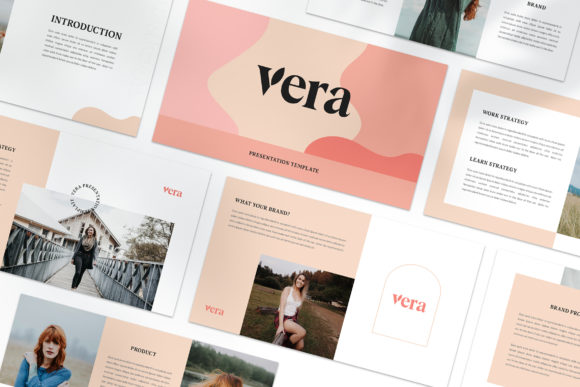
VERA Google Slide Template: Clean, Minimal Presentation Design for Modern Media
Slides that look the same from beginning to end rarely hold an audience's attention. The VERA Google Slide Template takes a different approach by offering a minimal media presentation style where each slide stands on its own. Instead of relying on a single recurring layout, VERA provides varied compositions that feel more like a lookbook or magazine than a traditional slide deck. For professionals, marketers, and creators who need to present ideas with clarity and visual interest, this template offers a practical balance of consistency and variety.
What VERA Brings to Your Presentation Workflow
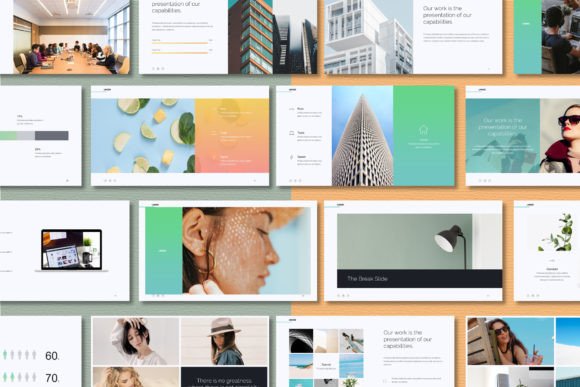
VERA is built around the idea that every slide should contribute something distinct to the narrative. The template includes multiple layout variations, all sharing a cohesive color scheme and typographic system, but each arranged differently to support different types of content. You get a full HD 1920x1080 resolution, a unique theme color that can be changed automatically across the deck, and slide master integration for easy image and text replacement.
The template is delivered as a PPTX file, but it is designed with Google Slides compatibility in mind. The instructions include details on free fonts used, and the help PDF guides you through setup and customization. The goal is to let you drop in your own images and text without wrestling with alignment or formatting issues.
Slide-by-Slide Uniqueness
Most presentation templates rely on a small set of layouts repeated throughout the deck. VERA deliberately avoids this. Each slide is composed differently, with varying image placements, text block arrangements, and visual hierarchies. This approach works well for storytelling, portfolio reviews, brand presentations, and any situation where monotony could weaken impact.
Magazine and Lookbook Style
The template draws inspiration from editorial design. Slides feel less like bullet-point containers and more like pages from a well-designed publication. This aesthetic suits digital media, marketing campaigns, creative portfolios, and brand lookbooks. If your goal is to present visual content alongside concise messaging, the layout supports that balance naturally.
Automatic Color Consistency
A unique theme color system lets you change the entire deck's palette in one action. This is particularly useful when you need to match a brand identity or adapt the same deck for different clients. The color change applies uniformly, so you maintain visual cohesion without editing each slide individually.
High-Resolution and Slide Master Efficiency
At full HD resolution, your slides look crisp on modern screens and projectors. The slide master setup means you can drag and drop images into placeholders without resizing or cropping manually. This reduces setup time significantly, especially when working with multiple images across many slides.
How VERA Performs in Real-World Use
When you open the template for the first time, the variety of layouts stands out. You are not looking at a deck where slides two through twenty feel interchangeable. Each layout serves a purpose: some emphasize full-bleed imagery, others prioritize text with small accent visuals, and a few balance both in asymmetric arrangements.
Customization is straightforward. Replace placeholder images with your own, update the sample text, and adjust the color theme. The free fonts are linked in the instruction file, so downloading them takes a minute before you begin. Once the fonts are installed, the template renders exactly as intended.
One practical benefit is how the lookbook style naturally limits text density. Because each slide has a designed composition, you are encouraged to keep copy concise and let your visuals carry the message. This constraint often improves presentation quality by forcing clarity.
Strengths in Real Scenarios
- Speed of assembly: Dragging images into slide master placeholders and typing over sample text means you can produce a polished deck in under an hour once you are familiar with the layout.
- Brand adaptation: The automatic color change makes it easy to customize the deck for different brands without rebuilding layouts.
- Audience engagement: Varied slide compositions keep viewers visually engaged. The magazine aesthetic feels more curated than a standard template, which can elevate perceived professionalism.
Possible Limitations to Consider
- Not ideal for data-heavy content: The minimal, editorial style works best when supporting text is concise. Slides with dense tables, complex charts, or extensive bullet lists may feel out of place.
- Image dependency: The template's impact relies heavily on strong visuals. If you do not have high-quality photographs or graphics, the slides may look sparse.
- Learning curve for slide master: While drag-and-drop is simple, users unfamiliar with slide master editing may need a few minutes to understand how to replace images correctly without disturbing layouts.
Who Benefits Most from VERA
VERA is not a one-size-fits-all template, and that is part of its value. It performs best for professionals and creators whose presentations depend on visual storytelling rather than data reporting.
Marketers and Brand Managers
Presenting a brand identity, campaign concept, or visual strategy benefits from a template that looks like a brand book. The magazine layouts let you show logos, color applications, typography samples, and mood imagery in an engaging sequence.
Digital Media Creators and Content Producers
If you pitch content strategies, editorial plans, or social media campaigns, the lookbook style naturally complements visual examples. Each slide can showcase a different content piece or channel without the deck feeling repetitive.
Freelancers and Small Business Owners
When you need to impress a client or partner with a polished presentation but have limited design skills, VERA reduces the gap between your ideas and a professional-looking deck. The template handles the layout, and you focus on messaging.
Educators and Speakers with Visual Content
For lectures, workshops, or keynotes that rely heavily on images, diagrams, or case studies, the varied slide layouts keep the audience's visual attention while you speak. The format works especially well for portfolio reviews, creative critiques, and visual case studies.
Publishers and Bloggers
VERA can double as a tool for creating media kits, pitch decks, or presentation versions of articles. The editorial aesthetic aligns naturally with publishing contexts.
Quality, Usability, and Long-Term Value
The template's quality rests on thoughtful layout design and reliable file structure. Because it uses slide master technology, edits propagate consistently. The full HD resolution ensures your content looks professional on any modern display. The free fonts are well-chosen, modern and legible, and the instruction document provides clear setup guidance.
Usability is strong for anyone comfortable with basic presentation software. The main learning point is understanding how to work with slide master placeholders for images. Once that is clear, the customization process is quick. For users who prefer not to use slide master, you can also replace images directly on each slide, though this takes longer.
Long-term value depends on how frequently you create presentations and whether the lookbook style fits your typical content. If you present visual work regularly, VERA can serve as a reliable starting point for many projects. The automatic color feature makes it easy to reuse the template for different clients or topics without rebuilding.
One aspect worth noting: the template includes picture placeholders only. All photographs shown in the preview are for illustration and are not part of the purchase. You will need your own images or free stock photos from sources like Unsplash or Pexels. This is standard for presentation templates, but worth remembering if you expected images to be included.
Practical Recommendations for Best Results
- Spend time selecting strong, high-resolution images before you start. The template's editorial style rewards visual quality.
- Keep text brief. Aim for one core message per slide, supported by a short sentence or phrase. Let the image carry the emotional weight.
- Use the automatic color change first to set your brand palette, then fine-tune individual slides if needed.
- Download the recommended free fonts before opening the file, so the template renders correctly from the start.
- If you are new to slide master editing, practice on a copy of the file before building your final deck.
Is VERA Right for Your Project?
The VERA Google Slide Template offers a genuine alternative to conventional presentation decks. Its strength lies in treating each slide as a unique composition, giving your presentation a curated, magazine-like feel that stands out from standard templates. For professionals who need to present visual content with clarity and style, it provides a practical, time-saving solution.
Consider VERA if your next presentation will be image-forward, brand-focused, or narrative-driven. If your content is dense with text, data, or technical details, a more structured template might serve you better. For everything else, this template delivers a polished, modern aesthetic with the flexibility to adapt to your identity and message.
The design respects your content rather than overwhelming it. That restraint, combined with genuine layout variety, makes VERA a thoughtful choice for anyone who believes a presentation should be as engaging as the ideas it contains.