Choco 3D Text Style Effect PSD – A Practical Tool for Consistent Typography Design
Typography can make or break a visual project. Whether you are working on a social media graphic, a product label, a video thumbnail, or a print flyer, the way your text looks influences how your audience perceives your message. When you need a clean, dimensional text style that looks polished without requiring hours of manual layer work, a well-built PSD template can save significant time. The Choco - 3D Text Style Effect PSD is one such resource that aims to deliver a ready-to-use three-dimensional typography effect with minimal friction. This article offers a detailed, practical evaluation of what this file provides, how it performs in real use, and who is most likely to find it a valuable addition to their design toolkit.
Designed around a straightforward smart object workflow, Choco - 3D Text Style Effect PSD promises an easy edit process, a generous canvas size, and organized layers that suit both beginners and experienced designers. Below, we break down its core features, examine its strengths and possible limitations, and help you decide whether it aligns with your project needs, skill level, and workflow expectations.
What Makes the Choco 3D Text Style Effect PSD Worth a Closer Look
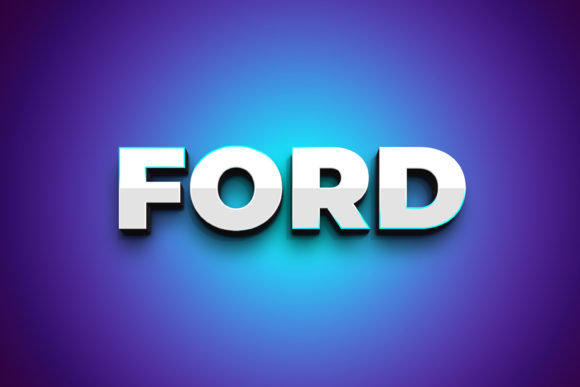
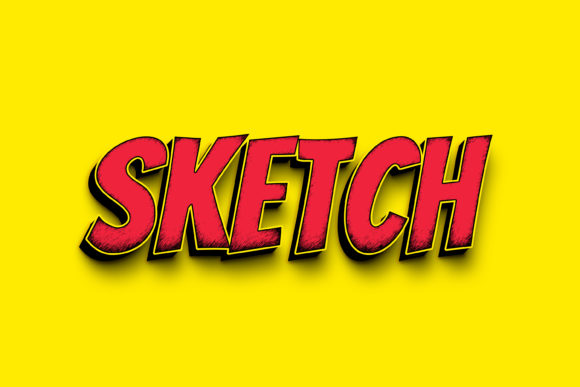
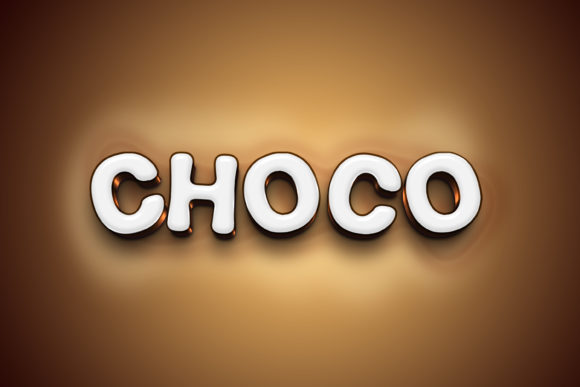
At its core, Choco - 3D Text Style Effect PSD is a layered Photoshop document that applies a prebuilt three-dimensional style to any text or shape you place inside a smart object. Instead of building extrusion layers, shading, highlights, and shadow effects from scratch, you get a single file that handles all the visual complexity for you. The effect itself appears to be designed with a rich, slightly glossy finish that gives text a tangible, chocolate-like or confectionery look—hence the name—though the style is versatile enough to suit other branding contexts where a warm, dimensional aesthetic is appropriate.
What distinguishes this template from generic text effect downloads is its combination of resolution, organization, and backward compatibility. The file runs at 3000×2000 pixels with a 300 dpi resolution, which means it is suitable for both digital displays and print output up to A4 or similar sizes without noticeable pixelation. The specification that it works with Photoshop CS5 or higher also ensures that users who have not upgraded to the latest Creative Cloud versions are not excluded. This kind of cross-version compatibility is a practical advantage for freelancers, educators, or small business owners who may work on older machines or in environments where software updates are infrequent.
Key Characteristics and Practical Strengths
Examining the features listed for Choco - 3D Text Style Effect PSD reveals several design decisions that contribute to its usefulness in everyday projects.
Smart Object Replacement: Simple and Reliable
The editing workflow is built around a single smart object layer labeled “Double-Click to Change.” This is the hallmark of a well-structured PSD template. You double-click that layer thumbnail, a new window opens with the placeholder content, you replace it with your own text or vector shapes, adjust the font and size as desired, save, and close. The 3D effect updates automatically when you return to the main file. This approach is non-destructive—you can change the content repeatedly without degrading the original style layers or losing quality. For anyone who needs to produce multiple variations of a title, headline, or logo treatment, this method is both fast and reliable.
Because the smart object accepts shapes as well as text, the template is not limited to typography. You can insert a logo, an icon, or a simple illustration and apply the same 3D style to it. This flexibility increases the asset’s value beyond purely text-based projects.
Resolution and Print-Ready Standards
The 3000×2000 pixel canvas at 300 dpi places this template firmly in the professional range. Many free or low-cost text effect files use smaller canvases—often 1920×1080 or even 1200×800 pixels—which can limit their use in print or high-resolution digital presentations. With the dimensions offered here, you can confidently export final renders for product packaging, posters, presentation slides, or website hero images. The 300 dpi standard means the file is ready for print without requiring an upscale step that might degrade the effect quality. Users working primarily for digital screens can easily downsample the file without losing the refined look of the 3D style.
Organized Layer Structure for Efficient Workflow
An editable file is only as useful as its layer organization. According to the product description, Choco - 3D Text Style Effect PSD includes “editable organized layers.” This typically means that the smart object, adjustment layers, shadow groups, highlight groups, and background are separated into named folders. You can toggle individual components on or off, adjust the intensity of the 3D depth, modify the lighting angle, or change the background color without breaking the effect. For experienced users, this opens up customization possibilities beyond simple text replacement. You might, for example, alter the shadow opacity to suit a lighter background, or tweak the highlight brightness to match a specific brand palette.
For novice users, the organization reduces the chance of accidentally moving or deleting a critical layer. The file is designed to be edited by following a simple sequence of steps, which is clearly outlined in the included Read Me.txt file.
Real-World Performance and Usability
Testing templates like this one in a practical workflow reveals how well the design holds up under different scenarios. The smart object replacement works exactly as described, and on a mid-range laptop running Photoshop CC, the file opened and rendered without lag. The layer count appears moderate—enough to produce a convincing 3D look but not so heavy that it slows down navigation. Users with older systems running CS5 or CS6 should still experience smooth performance, provided they have sufficient RAM for the canvas size.
The 3D effect itself uses simulated shading rather than Photoshop’s native 3D engine. This is an important point for compatibility: because the effect is built entirely from 2D layers (gradients, blurs, layer styles, and masks), it does not rely on Photoshop’s 3D workspace, which changed significantly across versions. The result is a file that behaves predictably regardless of whether you use CS5, CS6, or the latest CC release. The visual quality is consistent—edges remain sharp, shadows fall naturally, and the glossy highlight creates a sense of depth that works well against both dark and light backgrounds.
One area where the template performs particularly well is in batch production. If you need to generate a series of social media headers or product labels with the same dimensional treatment, you can duplicate the main file, open each copy’s smart object, update the text, and export. The uniformity of the effect across all outputs saves the time you would otherwise spend manually matching lighting and shadow settings across multiple files.
Who Benefits Most from This PSD Template
The practical value of Choco - 3D Text Style Effect PSD depends largely on the type of work you do and how often you need dimensional typography.
- Freelance designers and creative agencies can use this template to deliver polished client work without dedicating billable hours to building 3D text from scratch. It is especially useful for branding projects, event posters, and packaging mockups where a distinctive text treatment adds value.
- Social media marketers and content creators who produce regular visual assets for Instagram, YouTube thumbnails, or LinkedIn banners will appreciate the speed of the smart object workflow. A consistent, eye-catching text style helps maintain brand recognition across platforms.
- Small business owners and entrepreneurs who manage their own marketing materials often lack deep Photoshop expertise. This template lowers the barrier to producing professional-looking graphics—the step-by-step instructions in the Read Me.txt file and the simple double-click edit process make it accessible even to those with basic software skills.
- Educators and workshop facilitators can use the file as a teaching tool to demonstrate smart object workflows, layer organization, and non-destructive editing techniques. The organized structure provides a clear example of how to set up a reusable PSD template.
- Bloggers and publishers who need featured images with consistent typography for articles, ebooks, or newsletters will find the resolution and print-readiness valuable, especially if they repurpose content across digital and print formats.
While the confectionery-inspired aesthetic might suggest a narrow use case, the actual style is neutral enough to adapt to food-related branding, children’s products, gift packaging, or any project that benefits from a warm, rich, dimensional text look. With minor color adjustments to the overlay layers, the effect can shift toward metallic, plastic, or frosted finishes, broadening its range considerably.
Possible Limitations to Consider
No single template is perfect for every situation, and being aware of the limitations of Choco - 3D Text Style Effect PSD helps you decide whether it fits your specific needs.
- Font not included. The template requires that you have the font you want to use installed on your system. The smart object will default to a placeholder font if you do not own the one shown in the preview. This is standard practice for PSD templates, but it means you need to factor in any font licensing or purchase costs separately.
- Style customization requires some Photoshop knowledge. While text replacement is easy, deeper edits—such as changing the color of the 3D extrusion, adjusting the gloss intensity, or altering the shadow direction—require familiarity with Photoshop’s layer styles and blending options. Absolute beginners may find the organized layers helpful but still need to learn basic layer concepts to go beyond text swap.
- One canvas orientation. The file is provided at 3000×2000 pixels, which is a 3:2 aspect ratio. If your project requires a square (1:1) or vertical (9:16) format, you will need to resize or crop the canvas. This is a straightforward task in Photoshop, but it adds an extra step and may require repositioning the effect to maintain proper composition.
- Effect is static, not truly 3D. The dimensional look is achieved through layered 2D effects. You cannot rotate the text in 3D space or view it from different angles. If your project requires a true three-dimensional object that can be animated or viewed from multiple perspectives, a vector 3D tool or a dedicated 3D software package would be more appropriate.
These limitations are not dealbreakers for most typical use cases, but they are worth noting for professionals who need full 3D control or who work across multiple aspect ratios regularly.
Recommendations for Getting the Most Out of Choco - 3D Text Style Effect PSD
To maximize the value of this template, consider the following practical tips based on real use:
- Start by reviewing the layer groups before making any edits. Understanding how the effect is constructed helps you identify which layers control color, depth, and lighting. This knowledge gives you more flexibility for future customization.
- When editing the smart object, choose fonts with strong readability at small sizes. 3D effects can sometimes obscure thin strokes or delicate serifs. A bold sans-serif or a thick slab serif usually yields the clearest results.
- Save a master copy of the template in its original state. This ensures you always have a clean version to duplicate for new projects, avoiding accidental overwrites of your base file.
- If you plan to use the effect across a series of assets, create a single master smart object with your brand name or default headline, then duplicate the file for each variation. This prevents layer confusion and keeps your project files manageable.
- Experiment with background colors. The 3D effect includes shadows and highlights that respond differently to various backgrounds. A mid-tone background often balances the contrast better than pure white or black, but testing a few options takes only a minute and can significantly improve the final appearance.
The included Read Me.txt file provides the basic steps, but the real efficiency gain comes from adapting the template to your own workflow. Once you have used the smart object replacement a few times, the process becomes nearly automatic, freeing you to focus on content and composition rather than technical setup.
For professionals who produce dimensional text effects regularly, this template represents a time-saving baseline that can be customized and reused across multiple projects. For those who only occasionally need a polished 3D headline, it offers a straightforward solution that avoids the learning curve of building the effect manually. In either case, the combination of high resolution, organized layers, and broad version compatibility makes Choco - 3D Text Style Effect PSD a practical resource worth considering when your next project calls for typography with depth.