ROBUSTA PowerPoint Template: A Practical Look at Its Design and Real-World Use
Choosing a presentation template often involves balancing visual appeal with practical functionality. Many templates promise flexibility but deliver repetitive layouts that quickly feel stale. The ROBUSTA PowerPoint Template approaches this challenge differently, emphasizing unique slide designs rather than recycled structures. Whether you are preparing a pitch for investors, building a brand deck for a client, or crafting a portfolio for your own work, understanding what ROBUSTA offers and where it fits best can save you time and help you produce more polished results.
What Makes ROBUSTA Distinct From Other Presentation Templates
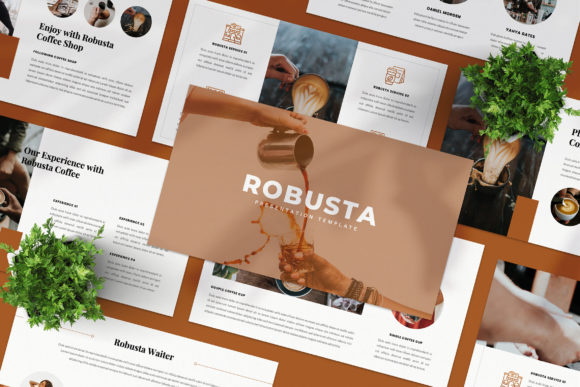
The most immediate impression of ROBUSTA is its variety. With 36 unique slide layouts, the template avoids the common pitfall of offering a handful of base designs that are simply duplicated with minor color changes. Each slide in ROBUSTA feels intentional, with distinct arrangements of image placeholders, text areas, and graphical elements. This variety matters because audiences notice repetition. A deck that looks like the same slide replayed 20 times can undermine your message. ROBUSTA’s approach gives you the visual range to maintain interest throughout an entire presentation.
The template also adopts a magazine-style layout philosophy. This means you are not limited to rigid bullet points and title bars. Instead, you have access to layouts that mimic editorial spreads, with space for full-bleed images, pull quotes, infographic-inspired sections, and modular content blocks. This style works particularly well for digital media, marketing proposals, and brand storytelling, where visual hierarchy and pacing are as important as the information itself.
Slide Master Integration and Editing Workflow
One of the more practical features in ROBUSTA is its use of Slide Master technology. Instead of manually adjusting every slide when you need to change a color scheme or font, the master slides allow you to make global adjustments that propagate throughout the deck. This saves time and ensures consistency. The template also includes an automatic color change feature, which lets you switch the theme color without rebuilding your slides. For anyone who has spent hours manually updating presentation colors to match a brand guideline, this is a welcome efficiency.
Drag-and-drop image placeholders are another time-saver. You do not need to crop, resize, or manually position every image. Simply drop your chosen photograph into the placeholder, and the template maintains the intended composition. The high-resolution 1920x1080 pixel Full HD format ensures that images display crisply on screens and projectors alike.
Strengths in Practical Use: What ROBUSTA Does Well
In real-world scenarios, the value of a template comes down to how much customization you need to do before it feels like your own. ROBUSTA is built to be fully editable, so you are not locked into presets. Text boxes, image layers, and color swatches are all accessible for direct modification. This openness is important for professionals who need to align the deck with specific brand guidelines or client requirements.
The 36-slide count is generous without being overwhelming. It gives you enough variety to cover a full presentation without forcing you to discard or reuse slides you do not want. Many users find that they can build a complete deck from start to finish using only the included layouts, rarely needing to create new slides from scratch. This makes the template suitable for both quick turnaround projects and more thorough presentations that require multiple sections.
Another strength is the inclusion of supplementary assets. The template comes with mockups, icons, and map graphics. These extras reduce the need to source additional design elements separately. The icons and map assets are particularly useful for business presentations, marketing proposals, and data-heavy slides, where visual aids can help clarify complex information.
Typography and Font Flexibility
ROBUSTA uses free fonts, with links provided in the Help Instruction PDF. This approach keeps the template accessible and keeps your costs low. Free fonts are widely available and compatible with most systems, so you can share the editable file with collaborators without worrying about missing font licenses. The font choices in the template are modern and readable, which supports both screen-based presentations and printed handouts.
That said, if you have established brand fonts, you can easily replace the free fonts with your own. The template’s structure accommodates font swaps without breaking the layout, as long as you replace fonts in the Slide Master view first.
Who Benefits Most From Using ROBUSTA
ROBUSTA is not designed for every type of presentation. Its strengths align with certain use cases and audiences better than others. Understanding these fit points will help you decide whether this template is the right tool for your next project.
Marketing and Creative Professionals
If you work in marketing, branding, or creative services, ROBUSTA’s magazine-style layouts are a natural fit. You can use them to present campaign concepts, brand identity systems, social media strategies, or content calendars. The editorial feel of many slides helps your ideas stand out, especially when you are trying to sell a visual concept to a client or internal stakeholder. The variety of layouts also lets you tailor each section of your presentation to the specific type of content you are sharing, whether that is case studies, mood boards, or data summaries.
Entrepreneurs and Small Business Owners
For entrepreneurs who frequently pitch to investors, partners, or customers, ROBUSTA offers a polished look without requiring professional design skills. The template handles most of the layout decisions, so you can focus on your content. The automatic color change feature is especially useful if your brand colors change or if you need to customize the deck for different audiences. Having a consistent, professional presentation can influence how seriously your business is taken, and ROBUSTA helps you achieve that without a large upfront investment in design services.
Educators and Trainers
Presentations for workshops, training sessions, or academic lectures can benefit from the varied slide formats. Instead of filling screen after screen with bullet points, you can alternate between image-driven slides, quote highlights, and structured text layouts. This variety helps maintain learner engagement over longer sessions. The map and icon assets are also useful for geography-related topics, process explanations, or comparative analysis slides.
Freelancers and Solopreneurs
Freelancers who need to present their portfolios, pitch new clients, or share case studies will find the lookbook-style layouts particularly effective. These slides allow you to showcase visual work prominently, with supporting text placed in clean, unobtrusive areas. The drag-and-drop image placeholders make it easy to swap in your latest projects without rebuilding the slide structure.
Practical Recommendations for Getting the Most Out of ROBUSTA
To maximize the template’s effectiveness, start by planning your slide structure before you begin inserting content. Review all 36 layouts first, noting which ones suit your main sections, transitions, and key points. This upfront planning saves time and helps you avoid forcing content into an ill-fitting layout.
When selecting images, use high-quality photographs that match the tone of your presentation. The template is designed for Full HD resolution, so images from sources like Unsplash or Pexels work well. Avoid heavily compressed or low-resolution files, as they will look noticeably soft on large screens. Remember that the preview images shown in the template listing are for illustration only and are not included in the file. You will need to source your own visuals.
Take advantage of the automatic color change feature early in your workflow. Set your primary brand color first, then adjust secondary colors as needed. Doing this before you start building content ensures that all slides adopt the correct palette from the beginning, reducing rework later.
Possible Limitations to Consider
No template is perfect for every situation, and ROBUSTA has a few considerations worth noting. The magazine-style layouts are visually rich, but they may not suit every audience. If you are presenting to a conservative boardroom that expects a more traditional slide structure, the editorial feel could feel too casual. In those cases, you might need to adapt certain slides or use simpler layouts from within the template.
The 36-slide count, while generous, means you may need to remove slides you do not need rather than adding many new ones from scratch. If you prefer starting with a minimal deck and building out, you will spend some time deleting and reorganizing. The template is best used when you have a clear vision for a full presentation from the outset.
Additionally, because the template uses free fonts, you should verify that the specific fonts listed in the Help Instruction PDF are compatible with your operating system and PowerPoint version. In rare cases, font rendering can differ between Windows and macOS, so previewing your deck on the final display device is a good practice.
Long-Term Value and Reusability
One of the more practical aspects of ROBUSTA is its reusability. Once you have customized the master slides with your brand colors, fonts, and logo, you can use the template as a base for multiple presentations over time. This is especially valuable for agencies or in-house marketing teams that produce regular decks for recurring meetings, quarterly reports, or pitch cycles. The initial setup effort pays off each time you start a new presentation from the same template file.
The inclusion of mockups, icons, and maps also adds long-term utility. These assets are not tied to a single presentation and can be repurposed across different projects. Over time, the template becomes more than just a slide deck; it becomes a small library of design resources that you can draw on when needed.
Final Thoughts on ROBUSTA PowerPoint Template
ROBUSTA stands out because it treats each slide as a distinct design opportunity rather than a repeated formula. The 36 unique layouts give you the flexibility to build presentations that feel fresh and intentional. Its Slide Master integration, automatic color change, and drag-and-drop placeholders reduce the technical friction often associated with customizing PowerPoint templates. The magazine-style approach suits modern marketing, digital media, and brand storytelling, while the free font policy keeps costs low. If your typical presentation work involves visual narratives, creative pitches, or audience-facing decks where variety matters, ROBUSTA offers a practical and polished foundation. Just be mindful of its editorial aesthetic and plan your content around the strengths of the layouts. For professionals, entrepreneurs, marketers, and educators who want a presentation that looks custom without the custom price tag, ROBUSTA is a worthwhile option to keep in your toolkit.