Oishii Powerpoint Template: A Detailed Look at Its Design, Flexibility, and Best Use Cases
When you are preparing a presentation for a client pitch, a marketing campaign overview, or a personal portfolio review, the template you choose can significantly influence how your message lands. Many presentation templates rely on a single layout duplicated across dozens of slides, leaving you to fill in the gaps without much structural variety. The Oishii Powerpoint Template takes a different route. Instead of recycling the same slide design, each of its 36 slides offers a unique arrangement, making it worth a closer look if you value visual distinction and editorial-style storytelling.
This article explores what makes this template distinct, how it compares with more conventional presentation formats, and where it fits best—or falls short—so you can decide whether it aligns with your next project.
What Sets Oishii Apart: Unique Slides Instead of Recurring Layouts
Most presentation templates you encounter are built around a handful of master slides. You get a title slide, a section divider, a content slide with bullet points, perhaps an image-centric layout, and a closing slide. While this approach is efficient for rapid content creation, it often leads to visual monotony, especially if your presentation runs longer than ten slides.
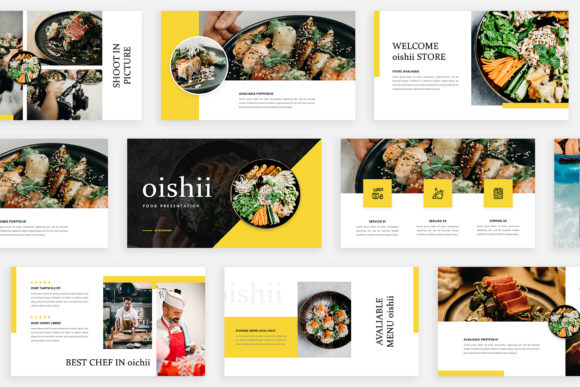
The Oishii Powerpoint Template addresses this by offering 36 slides where each one is a distinct design. That means you are not simply swapping text into a repeated frame; you are moving through a sequence of thoughtfully composed layouts that vary in image placement, text positioning, color block usage, and overall composition. This structure is particularly useful for presentations where you want to maintain viewer engagement through visual pacing—each new slide feels like a fresh page in a magazine rather than a slight variation of the one before.
For someone preparing a digital media deck or a marketing proposal, this variety can help you control the rhythm of your narrative. You can use a full-bleed image slide to make an emotional impact, follow it with a split-layout slide to present contrasting data, and then move to a minimalist text slide for a key message. The template essentially gives you a ready-made storyboard, reducing the time you spend on aligning elements from scratch.
Design Language: Lookbook and Magazine Style Layouts
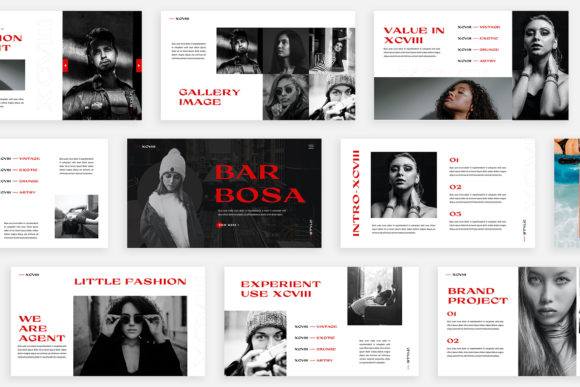
The template’s aesthetic is heavily influenced by lookbook and magazine design principles. This means you will encounter generous use of white space, asymmetric grids, overlapping text and imagery, and carefully considered typographic hierarchies. The full HD resolution (1920×1080 pixels) ensures that every detail renders clearly on modern screens, which is important if you are presenting on a large monitor or projecting to a room.
One practical benefit of this style is that it naturally guides the viewer’s eye. In a magazine layout, editors use visual weight to direct attention from headline to image to body text. Oishii applies a similar logic to its slides, so even if you are not a trained designer, your content can look professionally curated. The unique theme colour feature also lets you shift the entire palette automatically, which is handy when you need to match brand colors or adapt the deck for different clients without manually recolorizing each element.
Compared to more corporate or template-driven slide decks, this design approach leans toward the expressive and editorial side. If your content relies heavily on dense data tables, complex flowcharts, or detailed financial projections, the magazine aesthetic may not be the most practical fit. But for storytelling, brand presentations, lookbooks, fashion decks, or creative project proposals, the visual language works in your favor.
Strengths and Practical Tradeoffs
Every template comes with tradeoffs, and understanding them helps you match the tool to the task. Let’s look at where Oishii excels and where you might need to look elsewhere.
Strengths
- Visual variety without extra work: Because each slide is already a unique design, you spend less time customizing layouts and more time refining your message. The drag-and-drop functionality via Slide Master means you can replace placeholder images quickly without breaking the design.
- Professional finish for non-designers: The magazine-style layouts do the composition work for you. Even if you have limited experience with design software, the template gives your slides a cohesive, polished look.
- Automatic color theming: The ability to change the theme color across all slides with a few clicks is a time-saver when you need to adapt the same deck for different brands or contexts.
- Free fonts and clear instructions: The included help instruction PDF links to free fonts, so you are not locked into a paid typeface ecosystem. This keeps your costs down and makes collaboration easier since others can access the same fonts.
Tradeoffs and Limitations
- Learning curve for full customization: While dragging and dropping images is straightforward, making deeper modifications—like altering the grid structure or changing the typographic hierarchy—requires comfort with PowerPoint’s Slide Master view. If you prefer to heavily customize every element, you may find the pre-built layouts somewhat restrictive.
- Not optimized for heavy data: The lookbook style prioritizes imagery and concise text. If your presentation includes large tables, extensive bullet lists, or complex diagrams, you may need to adapt some slides or supplement with additional templates.
- Images not included: The photographs in the preview are for illustration only. You will need your own high-quality images to achieve a similar impact. This is standard for most premium templates, but it is worth noting if you are expecting a ready-to-use image library.
- Slide count may exceed your needs: With 36 unique slides, the template offers a lot of variety. For a short 10-slide presentation, you may find yourself skipping many designs. That is not a problem per se, but if you prefer a leaner template with fewer choices, Oishii may feel more expansive than necessary.
How It Compares to More Conventional Approaches
To make an informed decision, it helps to place Oishii alongside the two most common alternatives: traditional corporate templates and fully custom-designed presentations.
Traditional corporate templates typically offer 10 to 20 slides with three to five repeated layouts. They are efficient for internal reports, status updates, and meetings where consistency matters more than visual impact. However, they often lack the narrative flow that creative presentations require. If your audience includes marketing stakeholders, potential clients, or event attendees, the Oishii template’s variety gives you an advantage in holding attention. On the other hand, if your presentation is a routine quarterly review for a conservative organization, a standard template may be the safer and more expected choice.
Fully custom-designed presentations offer unlimited flexibility but come with a significant investment of time or money. You either hire a designer or spend hours crafting each slide yourself. Oishii sits in the middle—it gives you a designer-level structure without the custom cost. The tradeoff is that you work within the template’s constraints. For most marketing and digital media presentations, those constraints are reasonable, but if your vision requires a completely unconventional layout or interactive elements, a custom build may still be the better route.
Another less common but relevant alternative is a modular template system where slides can be rearranged and mixed from different theme packs. Oishii is a single cohesive set, so you get a unified look throughout. This is a strength when you want a consistent visual identity, but it can be a limitation if you prefer to combine styles from multiple sources.
When Oishii Is the Right Choice
Based on its strengths, Oishii works well in several specific scenarios:
- Creative pitch decks: When you are presenting a brand concept, a campaign idea, or a design proposal, the magazine-style layouts help convey creativity and attention to detail.
- Digital media and marketing presentations: The template’s emphasis on imagery and concise text aligns with how marketing content is often consumed—visually first, then verbally.
- Lookbooks and portfolio reviews: If you work in fashion, photography, interior design, or any visually driven field, the slide variety lets you showcase your work in different contexts within the same deck.
- Personal branding or startup presentations: For entrepreneurs and freelancers who need to present to potential partners or investors without a large budget, Oishii offers a professional look at a fraction of the cost of custom design.
When You May Need Another Option
The template is not a one-size-fits-all solution. Consider a different approach in these situations:
- Data-heavy or technical presentations: If your content relies on spreadsheets, statistical charts, or detailed process flows, look for a template with built-in chart placeholders and more structured grid layouts.
- Very short or very long decks: For a five-slide quick pitch, the variety may feel unnecessary. For a 50-slide training manual, you might run out of unique layouts that fit your content needs, or the magazine style may become visually exhausting.
- Team collaboration across multiple templates: If multiple people are contributing slides and they have varying design experience, maintaining a consistent look can become challenging if everyone customizes differently.
Practical Decision Factors to Consider
Before you choose the Oishii Powerpoint Template, ask yourself a few questions:
- What is the primary goal of your presentation? If it is to inform through data and logic, a more structured template may serve you better. If it is to inspire, persuade, or showcase, Oishii’s editorial style aligns well.
- Who is your audience? Creative professionals, marketing decision-makers, and external clients are more likely to appreciate a visually varied deck. Internal teams and conservative stakeholders may prefer consistency over novelty.
- How much time do you have for customization? Oishii is quick to get started with, especially if you have your own images. But if you need to deeply modify the grid or typography, budget extra time to learn the Slide Master functions.
- Do you have access to quality images? The template relies on strong photography to achieve its look. Make sure you have a library of high-resolution images, or plan to source them before you begin building your slides.
Making an Informed Choice
The Oishii Powerpoint Template occupies a specific niche: it is for presenters who want the visual impact of a magazine or lookbook without hiring a designer. Its 36 unique slides give you a diverse vocabulary to tell your story, and the automatic color theming adds flexibility for branding. At the same time, it is not a universal tool. Data-heavy presentations, extremely short decks, or projects requiring full design freedom may call for a different resource.
By understanding where this template excels and where it has limitations, you can match it to the right context. Whether it becomes the backbone of your next client pitch or you set it aside for a more data-friendly option, the key is to choose based on your audience, your content, and the impression you want to leave. That is the practical approach to making any presentation template work for you, not the other way around.