Ford 3D Text Style Effect PSD: A Complete Guide to Smart Object Replacement and Professional Typography
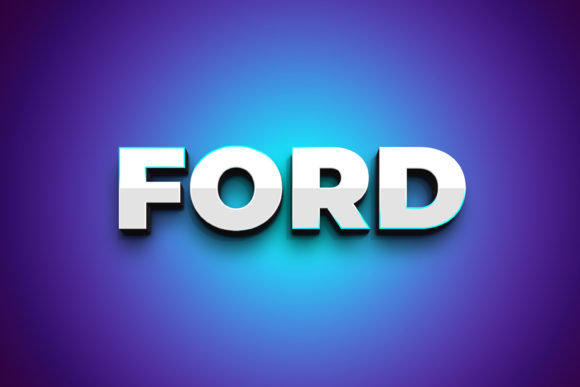
Typography remains one of the most influential elements in visual communication, and the ability to produce three-dimensional text effects without mastering complex 3D software is a significant advantage for many creative professionals. The Ford 3D Text Style Effect PSD offers a streamlined approach to generating high-impact dimensional typography through Smart Object Replacement, making it accessible to designers of varying skill levels. This resource, built around a 3000×2000 pixel canvas at 300dpi, provides a ready-to-use framework for crafting bold, layered text compositions within Adobe Photoshop CS5 or higher. Understanding how to leverage such a file effectively can transform your workflow while maintaining professional output quality across multiple projects.
Deconstructing the Smart Object Replacement Workflow
The core functionality of the Ford 3D Text Style Effect PSD relies on Smart Object technology, a feature in Photoshop that preserves an image's source content with all its original characteristics. When you open the PSD file, you will encounter a layered structure where the text element exists as a Smart Object labeled “Double-Click to Change.” This design choice is deliberate: it isolates the editable component from the applied layer styles, shadow effects, gradients, and texture overlays that create the three-dimensional appearance. By double-clicking that thumbnail, you open a separate document window containing the current text or shape. Any modifications you make here—whether typing new words, adjusting the font, or inserting vector shapes—will update automatically in the main composition upon saving and closing that window.
This non-destructive editing approach means you never risk corrupting the carefully calibrated 3D effect settings. The layer styles, including bevel and emboss parameters, contour curves, and lighting angles, remain intact regardless of how many times you swap the content. For professionals managing multiple deliverables, this translates into significant time savings. Instead of rebuilding the effect from scratch for each new client project or social media graphic, you simply update the Smart Object layer and save the file. The preview JPG file included in the package allows for quick visual checks before final export, streamlining the approval process with stakeholders who may not have Photoshop installed.
Understanding Layer Organization and Editability
Organized layers distinguish a production-ready PSD from a chaotic one. The Ford 3D Text Style Effect PSD arranges its components into clearly named groups, separating background elements, shadow layers, highlight reflections, and the core text Smart Object. This structure allows you to toggle visibility for individual effects, adjust opacity for metallic sheens, or experiment with alternative color palettes without disrupting the overall composition. For example, if you want a subdued version of the effect for a print brochure while keeping the vibrant variant for digital use, you can duplicate the file and modify specific layer groups accordingly.
The 300dpi resolution combined with the 3000×2000 pixel dimensions ensures that output remains crisp across both screen and print applications. At this resolution, a full-page print at A3 size with 300dpi is achievable, while downsizing for web use retains sharpness because the source data is abundant. Designers working on billboards, large-format posters, or high-resolution mockups benefit from having this headroom, as scaling down is always preferable to scaling up pixelated content. Additionally, the PSD file is compatible with Photoshop CS5 and later versions, covering a broad range of software generations still in use across agencies, freelance studios, and educational institutions.
Real-World Applications Across Creative Sectors
The versatility of the Ford 3D Text Style Effect PSD extends far beyond simple headline generation. In branding contexts, a dimensional text treatment can serve as a logo lockup for hero sections on websites or as a watermark on video title cards. Advertising agencies frequently require bold typography for print ads, billboards, and social media campaigns where stopping power is paramount. The 3D effect, with its built-in depth and lighting simulation, creates a tactile quality that flat text cannot achieve, making products or messages appear more substantial and premium.
For content creators and social media managers, the ability to quickly generate eye-catching quote graphics, channel art, or promotional banners using a consistent text style builds brand recognition. You can replace the placeholder text with seasonal messages, product names, or call-to-action phrases, saving time while maintaining visual consistency across posts. The editable font feature means you are not locked into a specific typeface; any font installed on your system can be used, though the Read Me.txt file includes a link to the recommended font for achieving the exact look shown in the preview JPG.
Educators and workshop facilitators can use the PSD file as a teaching tool for demonstrating Smart Object workflows, layer style configurations, and non-destructive editing principles. By walking students through the process of opening the file, editing the Smart Object, and observing the automatic update, instructors provide a concrete lesson in Photoshop efficiency. Hobbyists experimenting with typography or digital art can deconstruct the layer style settings to understand how each component contributes to the final 3D illusion, then apply those insights to their own projects.
Examples of Customization Scenarios
Imagine a freelance designer preparing a product launch campaign for a tech startup. Using the Ford 3D Text Style Effect PSD, they insert the product name into the Smart Object, adjust the font to match the brand guidelines, and then customize the color overlays within the layer groups to reflect the brand palette. Within minutes, the headline for the landing page mockup is ready. Another scenario involves a print shop producing signage for a retail store opening. The 300dpi resolution ensures that the dimensional text remains sharp when printed at large scale, and the organized layers let the printer isolate the text layer for spot UV coating or foil stamping simulations.
Non-designers, such as small business owners managing their own marketing, benefit from the straightforward workflow. Without needing to understand bevel depth, contour mapping, or highlight opacity, they can produce professional-looking graphics by simply editing the Smart Object. This democratization of advanced typography means that quality visual communication is no longer exclusive to those with years of software expertise.
Technical Considerations for Optimal Results
While the Ford 3D Text Style Effect PSD is designed for ease of use, several technical factors influence the final output. The font you choose matters significantly. Thin or lightweight typefaces may not carry the 3D effect as effectively as bold or heavy weights, because the layer styles rely on sufficient pixel area to create depth. The Read Me.txt file provides a link to the font used in the preview, which is likely selected for its robustness with dimensional effects. If you opt for a different font, test it first to ensure the bevel contours and shadow projections appear balanced.
The Smart Object replacement process is straightforward, but users should be aware of a few common pitfalls. When you double-click the Smart Object thumbnail, Photoshop opens a new window. After making your changes, you must save that window (File > Save) and then close it. Closing without saving will discard the edits. Also, if you insert vector shapes or additional elements into the Smart Object, confirm they are within the canvas boundaries to avoid clipping. The 3000×2000 pixel canvas offers ample space, but scaling content beyond those edges may cause unexpected cropping in the main composition.
Color Modes and Output Settings
The PSD file is typically set to RGB color mode, which is ideal for screen-based deliverables such as websites, social media images, and digital ads. If your project requires CMYK for print, you can convert the color mode after finalizing the text edits, though this may shift some layer style colors slightly. Testing a small version before mass output is advisable. The 300dpi resolution provides flexibility for both print and screen: for web use, you can downsample to 72dpi and reduce pixel dimensions without losing quality, while for print, the native resolution ensures smooth gradients and sharp edges.
Users working with Photoshop CS5 or newer will find full compatibility, but those on older versions may need to update. The file utilizes layer styles and Smart Object features that are stable across CS5 through the latest version, including Photoshop CC. Cloud subscribers benefit from additional features like pattern previews and enhanced layer style controls, but the core workflow remains identical across releases.
Advantages of the Smart Object Approach Over Traditional Methods
Before Smart Objects became standard, creating a 3D text effect often required manual duplication of text layers, offsetting them, applying gradients to each copy, and carefully aligning everything. Any subsequent text change meant redoing the entire stack. The Ford 3D Text Style Effect PSD eliminates this tedium by encapsulating the text within a single Smart Object, while the layer styles handle all depth, lighting, and texture automatically. This reduces file size because Photoshop stores only one text instance, and it dramatically increases editing speed.
Another advantage is consistency. When you develop a brand guideline that includes a specific 3D typography style, this PSD file becomes a template that can be reused across campaigns, ensuring that every occurrence of the treatment looks identical. Team members working on different projects can all access the same base file, edit their respective Smart Objects, and produce output that aligns with the established visual identity. This is particularly valuable for marketing departments, design agencies, and franchises where multiple people contribute to content creation.
Limitations and How to Work Around Them
No tool is without limitations, and understanding them helps you avoid frustration. The 3D effect is simulated through layer styles rather than being a true 3D model. This means you cannot rotate the text in three-dimensional space or change the camera angle. The perspective is fixed based on how the effect was originally designed. If your project requires dynamic 3D typography from multiple angles, you may need to complement this PSD with actual 3D software such as Cinema 4D or Blender. However, for the vast majority of graphic design applications—headlines, logos, posters, social graphics—the fixed perspective is more than sufficient and often preferred for its consistency.
Additionally, because the effect relies on pixel-based rendering, scaling the text within the Smart Object beyond a certain size may reveal the limits of the bevel contours. Keeping text sizes within a reasonable range relative to the canvas ensures that the depth and highlight details remain convincing. If you need drastically oversized typography, consider adjusting the canvas size of the Smart Object itself before editing the text, then scaling the effect layers correspondingly.
Observations on Workflow Efficiency
Design professionals often measure their tools by how much time they save without sacrificing quality. The Ford 3D Text Style Effect PSD excels in this regard. A task that might take twenty minutes using manual layer duplication and gradient adjustments can be accomplished in under two minutes using the Smart Object replacement method. Over the course of a week with multiple client revisions, that time savings accumulates significantly. The organized layers also reduce cognitive load; you do not have to hunt for the correct layer to adjust visibility or opacity because the groups are logically named and color-coded.
For users new to Photoshop, the file serves as a practical introduction to professional workflow practices. Seeing how a Smart Object is used, how layer styles can be stacked, and how non-destructive editing preserves flexibility provides a foundation that applies to countless other design scenarios. The inclusion of the preview JPG and Read Me.txt with font link ensures that even those unfamiliar with the process can achieve the desired result without guesswork.
Observations on Real-World Usage Patterns
In practice, many users report that they start by replacing the placeholder text with their own content, then experiment with color variations by adjusting the hue or gradient overlay within the layer style groups. Some keep the background transparent to composite the text over photos or video footage. Others add a background layer from the included options or their own imagery. The file's flexibility allows each user to integrate it into their existing workflow rather than forcing them to adapt to a rigid tool.
Advanced users sometimes duplicate the Smart Object layer to create multiple text elements within the same composition, each with the same 3D effect but different content. This is useful for creating montages, multi-word headlines, or stacked typographic layouts. Because each Smart Object is independent, you can edit each one individually without affecting the others, while the layer styles remain consistent across all instances.
Considering the broad audience that may benefit from this resource—from professional graphic designers and marketing teams to educators and small business owners—the combination of ease of use, high resolution, organized structure, and Smart Object technology makes the Ford 3D Text Style Effect PSD a practical choice for achieving polished dimensional typography quickly. Whether you are producing a single social media post or a comprehensive brand campaign, the ability to edit, reuse, and customize the effect with minimal friction aligns with the demands of modern visual communication.