BIANCA - Clean Google Slide Template
Every presentation you create is a chance to communicate an idea, a product, or a story. But when every slide looks the same, your audience’s attention drifts. The BIANCA - Clean Google Slide Template offers a different approach: a collection of 36 unique layouts, each designed with its own character, so your message never feels repetitive. Whether you are pitching to clients, presenting a marketing plan, or showcasing a portfolio, the right template can make the difference between a forgettable slideshow and one that leaves a lasting impression.
This article explores how BIANCA works, why its design philosophy matters, and who stands to gain the most from using it. We will look at the practical benefits, the thoughtful features, and a few honest considerations to help you decide if it is the right fit for your next project.
The Power of Unique Slide Designs
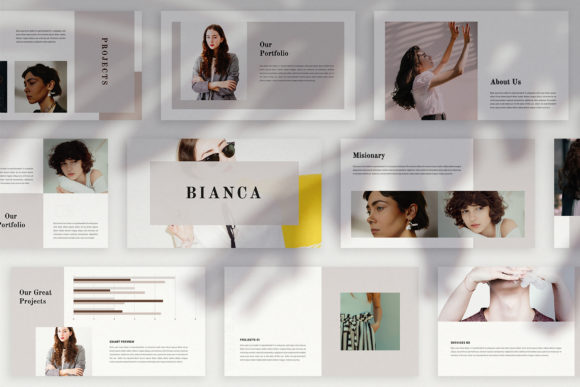
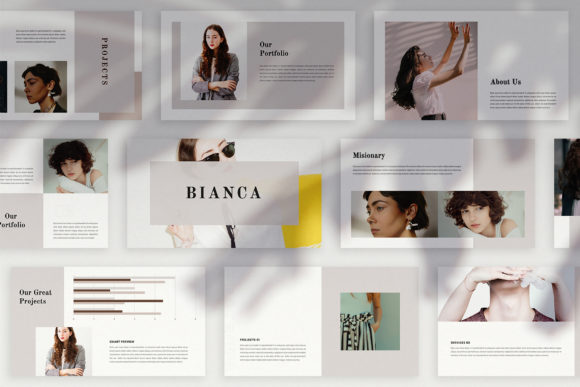
Most presentation templates rely on a handful of master slides that you reuse over and over. The result is a uniform look that can feel monotonous. BIANCA breaks away from that pattern. Every slide in this template is distinct. You will not find the same layout repeated with only a different image. Instead, you get variations in text placement, visual balance, and overall composition. This variety is especially useful when you need to present different types of content: a data-heavy slide demands a different structure than a full-bleed image spread or a quote page. By offering multiple unique designs, BIANCA lets you match each slide’s layout to the specific piece of information you want to highlight.
For a marketer creating a campaign pitch, this means you can lead with a dramatic hero slide, follow with a clean bullet-point breakdown, and then transition into a magazine-style editorial look—all without jarring the viewer. The coherence comes from a shared color palette and consistent typography, not from identical templates. Educators and freelancers will also appreciate this flexibility when building course materials or client proposals that need to feel dynamic yet professional.
High Resolution and Visual Impact
Every slide in BIANCA is built at 1920x1080 pixels, Full HD. In a world where presentations are often projected on large screens or shared digitally, resolution matters. Blurry images or pixelated text undermine credibility. The high-resolution canvas ensures that your photographs, icons, and graphics remain crisp. The template also includes picture placeholders and built-in mockups, which let you drop in your own visuals without distorting the layout. Icons and maps are provided as part of the package, saving you the trouble of sourcing separate assets.
When you use a slide deck for digital media—social media posts, video overlays, or website headers—the extra resolution becomes even more valuable. You can export individual slides as standalone visuals and use them across platforms. A well-composed slide from BIANCA can serve as an Instagram story, a LinkedIn banner, or a thumbnail for a webinar replay. The clean, magazine-inspired aesthetic lends itself to modern branding needs where every touchpoint should look polished.
Effortless Customization for Any Project
One of the strongest selling points of BIANCA is how easy it is to customize, even if you are not a design expert. The template is built with Slide Master, meaning you can drag and drop your images into the designated placeholders without worrying about alignment or sizing. Automatic color change features let you adjust the entire theme to match a brand palette in seconds. You are not locked into a single look; the unique theme color system allows you to experiment and find the right mood for your audience.
The PPTX file format works with Microsoft PowerPoint, and the free font links are provided in the help instruction PDF. This removes the guesswork from typography. The template is fully editable, so you can modify text, move elements, and even tweak individual slide layouts if the default does not suit your content. For a busy entrepreneur or a small business owner, this level of flexibility means you can produce a professional presentation in a fraction of the time it would take to design from scratch. You get the structure, and you only need to add your own content and images.
Because each slide is unique, you are also encouraged to think creatively about how to arrange your information. The lookbook and magazine style layouts inspire you to present images and text in a way that feels editorial rather than academic. This can be particularly effective for brand storytelling, where visual hierarchy and white space help guide the viewer’s eye.
Who Benefits Most from BIANCA
While BIANCA can be used by anyone who needs to present ideas, it is especially suited for professionals who regularly communicate with clients, partners, or audiences who value design. Marketers and digital media creators will find the template’s variety and polish a strong match for campaign presentations, social media strategy decks, and pitch proposals. The magazine-style layouts lend themselves to lookbooks, portfolio reviews, and case studies where images are just as important as text.
Bloggers and publishers who need to present editorial content to sponsors or collaborators can also leverage the clean, modern aesthetic. Freelancers—web designers, photographers, writers—can create compelling proposals that showcase their work without requiring advanced layout skills. Educators and trainers might use BIANCA to design course modules that break down complex subjects into visually digestible slides. The high-resolution output also works well for printables like handouts or posters.
Perhaps the most significant advantage is for anyone who wants to avoid the “template look.” Because BIANCA offers many unique layouts and a customizable color system, the final presentation can feel original. You are not handing your audience the same cookie-cutter design they have seen a dozen times before.
Practical Considerations to Keep in Mind
As with any presentation template, there are a few realities to be aware of. BIANCA does not include the photographs or pictures shown in the preview. Those are for illustration purposes only. You will need to supply your own images, and the help document points you to free resources like Unsplash and Pexels. This is standard practice for premium templates, and it actually gives you more control over the final look. You can choose visuals that directly support your message.
The free fonts used in the template require a download, and a link is provided. This is a minor extra step, but it ensures that your presentation displays correctly on any device. If you work in an environment where installing fonts is restricted, you may need to substitute with a similar web-safe font or check compatibility ahead of time. The template is optimized for PowerPoint, so Mac users or those relying on Google Slides may need to verify compatibility, although PPTX files generally transfer well.
Finally, while the 36 unique layouts offer plenty of variety, you might find that for very long presentations you will need to reuse some favorites. That is fine—the intention is to give you a rich starting point, not to restrict you. The template is a tool, not a straightjacket. Use the layouts that serve your story best, and feel free to adapt as needed.
BIANCA is designed to help you look presentable in front of your audience. The effort put into each slide’s uniqueness and the neat concept behind the template are meant to support your work, not overshadow it. For buyers who appreciate a thoughtful, flexible design, this template can be a reliable ally in creating presentations that communicate clearly and leave a positive impression.
Whether you are presenting a business proposal, a creative portfolio, or a digital marketing plan, the BIANCA - Clean Google Slide Template offers the structure and style to elevate your content. With high-resolution output, easy customization, and a genuine variety of layouts, it helps you focus on what matters most: the message you want to share.