BIANCA: The Clean Keynote Template Built for Impact
If you have ever spent hours tweaking slide layouts, fighting with inconsistent fonts, or trying to make a presentation look polished without design experience, you already know how frustrating the process can be. A great template should remove that friction, not add to it. That is exactly where BIANCA - Clean Keynote Template comes in. It is a presentation template built for people who value both aesthetics and efficiency, whether you are pitching to a client, presenting at a conference, or creating a portfolio piece that stands out.
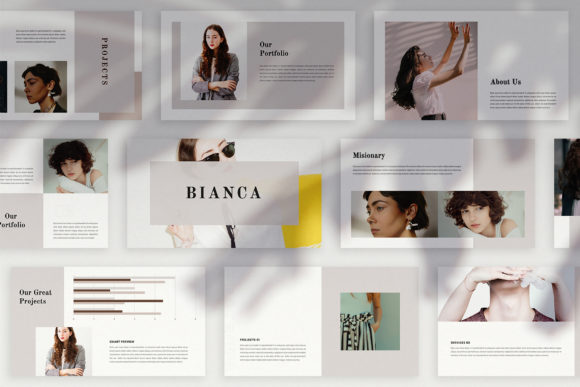
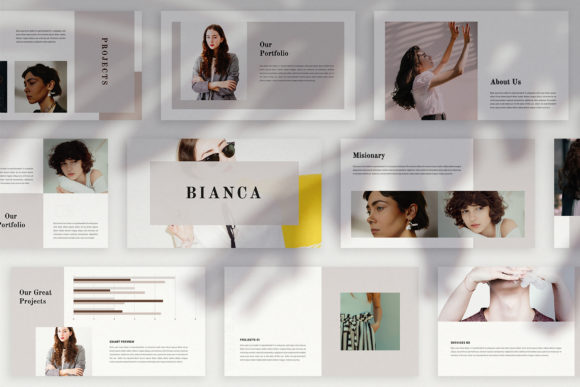
BIANCA is not your typical slide deck. Each slide is individually designed with its own layout, which means you never get that repetitive, cookie-cutter feeling that plagues most templates. Instead, you get a flowing visual narrative that keeps your audience engaged from start to finish. It is a presentation template that feels like a carefully crafted magazine or lookbook rather than a series of bullet points.
What Makes BIANCA Different from Other Keynote Templates
Most presentation templates rely on a few master slides that repeat across dozens of pages. You change the text and image, but the structure stays the same. BIANCA takes a different approach. With 36 unique slide layouts, each page offers a fresh composition. This variety is especially useful when you are telling a story that needs visual pacing, some slides for bold imagery, others for data, and still others for quotes or text-heavy content.
The template is built at Full HD resolution (1920x1080 pixels), so it looks crisp on modern displays, projectors, and even when exported as PDFs or images for social media. The colour theme is also designed for flexibility. You can change the entire palette automatically, which means you can adapt BIANCA to your brand guidelines or personal style without manually adjusting every element.
Another standout feature is the use of Slide Master technology. You simply drag and drop your images into placeholders, and the layout adjusts accordingly. If you have ever resized an image in a presentation only to have it stretch awkwardly, you will appreciate how seamless this workflow feels.
Who Should Use BIANCA
This template works across a surprisingly wide range of use cases. Here are a few examples based on real-world scenarios:
Marketers and Digital Media Professionals
When you are presenting a campaign strategy, a content calendar, or a brand overhaul, the visual quality of your deck reflects the quality of your work. BIANCA gives you a polished, editorial-style layout that makes your ideas look well thought out before anyone even reads the text. The magazine-style layouts are particularly effective for mood boards, style guides, and case studies where imagery plays a leading role.
Entrepreneurs and Business Owners
Whether you are pitching to investors, presenting to your board, or onboarding a new partner, your presentation needs to feel professional without being boring. BIANCA strikes that balance. The unique layouts help you avoid the monotony of standard corporate decks, while the clean typography and structured layouts keep the focus on your message.
Educators and Trainers
Teaching with slides that look identical page after page leads to audience fatigue. By using varied layouts, you can keep your learners visually engaged. BIANCA works well for course materials, workshop decks, and academic presentations where clarity and visual interest both matter.
Freelancers and Creatives
If you are a graphic designer, photographer, or content creator, your portfolio presentation needs to show off your work in the best possible light. The image placeholders are generous and well-proportioned, making your visuals the hero of each slide. The lookbook style is especially suited to creative portfolios where the layout itself should feel like part of the aesthetic.
Practical Benefits You Will Notice Immediately
One of the first things you will appreciate about BIANCA is how easy it is to customise. The template comes with a help instruction PDF that includes links to free fonts, so you do not need to purchase expensive typefaces just to make it work. Every element is fully editable. You can change colours, move objects, adjust text formatting, or replace icons and maps without needing to know advanced Keynote tricks.
The template also includes mockups, icons, and a map, which save you from hunting for supplementary assets. These additions might seem small, but they reduce the number of tabs you have open and the number of decisions you need to make while building your deck.
Another practical consideration is file size and performance. At Full HD resolution with well-structured layers, BIANCA remains responsive even on older Macs or iPads. You do not need the latest hardware to run it smoothly.
Real-World Use Cases and Recommendations
Let me share a few scenarios where BIANCA really shines:
- Client pitch decks: Use the varied layouts to alternate between problem statements, visual data, testimonials, and your solution. The flow keeps the client engaged without feeling like they are watching the same slide repeat.
- Internal company presentations: Quarterly reviews, team updates, and strategy meetings benefit from a clean, readable format. The automatic colour change feature lets you match your department or brand colours instantly.
- Event or conference talks: When you are speaking on stage, your slides need to support your words, not distract from them. BIANCA's clean design ensures your audience reads what matters without visual clutter.
- Portfolio reviews: For photographers, designers, and agencies, the lookbook-inspired layouts allow your work to breathe. You can tell a visual story without overcrowding each page.
A Note on Images and Assets
The photographs and pictures shown in the preview are for illustration only. They are not included in the purchase. This is standard practice for template creators, but it is worth mentioning so you plan accordingly. You can easily find high-quality, royalty-free images on sites like Unsplash or Pexels, and the drag-and-drop placeholders make inserting them effortless. If you budget a little time for sourcing imagery, the final result will look just as polished as the demo.
Why BIANCA Stands Out in a Crowded Market
There are thousands of Keynote templates available, but many fall into two categories: overly complex templates that require hours of learning, or overly simple ones that look basic. BIANCA sits in a sweet spot. It offers enough visual variety to feel premium, yet it remains approachable for anyone who has basic Keynote experience. The thoughtfulness of the layouts means you do not need to be a designer to produce a professional-looking presentation.
The unique colour theme system is another differentiator. Instead of manually updating each slide when you want to match a brand palette, you can change the theme colour and the entire deck updates automatically. This is a huge time-saver when you are preparing multiple versions for different clients or departments.
Final Thoughts on Choosing BIANCA
If you are looking for a presentation template that respects your time, elevates your content, and adapts to your specific needs, BIANCA - Clean Keynote Template is worth considering. It is especially well-suited for digital media, marketing, and creative professionals, but its versatility extends far beyond those fields. The 36 unique layouts, combined with easy customisation and thoughtful design, make it a practical choice for anyone who regularly presents to an audience.
Good presentations are about clarity, storytelling, and trust. Your template should support all three. BIANCA gives you a solid foundation so you can focus on your message, not on fixing misaligned text boxes or inconsistent spacing. Whether you are preparing for a boardroom meeting, a virtual webinar, or a creative showcase, this template helps you show up looking prepared and professional.
Remember, the goal is not to hide behind a beautiful template. It is to use the template as a tool that makes your ideas easier to understand and harder to forget. BIANCA does exactly that.