Lookbook Powerpoint Template
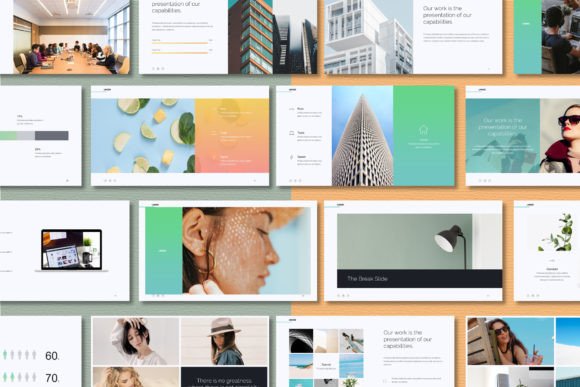
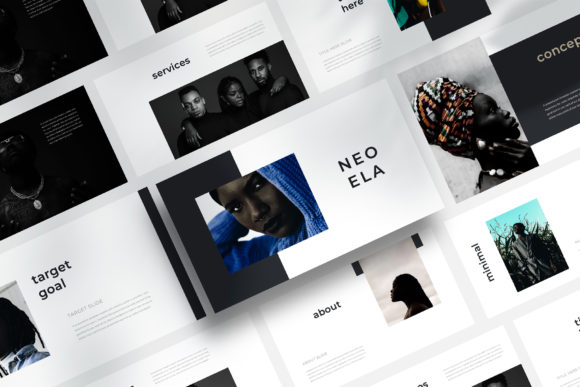
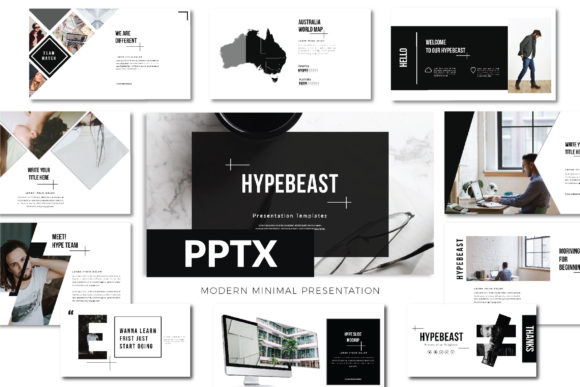
Presenting a product, a brand, or a creative vision often requires more than just information. The way you arrange images, text, and color can shape how your audience feels about what they see. A Lookbook Powerpoint Template offers a structured yet flexible starting point for building presentations that are both visually compelling and professionally polished. Designed with a minimal, ultra-modern aesthetic, this template prioritizes clarity and visual harmony, making it suitable for a range of purposes from product catalogs to marketing decks.
At its core, this template provides a set of pre-designed slides that follow a lookbook or magazine-style layout. Each slide is crafted to let your content — whether photography, product shots, or key messages — take center stage. The template is fully editable, allowing you to customize colors, text, and images without needing advanced design skills. Built with Slide Master technology, you can simply drag and drop your own images into place, and the layout adjusts seamlessly. The automatic color change feature lets you shift the entire theme color with a single click, giving you a fresh palette for different brands or seasons.
For those who value efficiency and quality, this template offers a practical solution. It comes in PPTX format at Full HD 1920x1080 resolution, ensuring your presentations look crisp on modern screens. The included free fonts and device mockup icons add extra polish without requiring additional purchases. Whether you are preparing a lookbook for a fashion collection, a product launch presentation, or a portfolio for a creative project, the structure is designed to save time while delivering a cohesive visual story.
What Makes This Template Stand Out
Many presentation templates offer generic layouts that can feel disconnected from the content. This template, however, is built around the lookbook concept — a format that emphasizes visual storytelling through carefully balanced image-and-text combinations. The minimal design means slides are not cluttered, allowing your products or photographs to breathe. The ultra-modern styling uses clean lines, generous whitespace, and thoughtful typography to create a premium feel without being flashy.
One of the most practical features is the unique theme color system. You can change the entire color scheme automatically, which is especially useful when you need to adapt a presentation for different brands, seasons, or client preferences. This saves hours of manual editing and helps maintain consistency across slides. The device mockup icons and magazine-style layouts further enhance the professional look, making the template suitable for both digital screens and printed materials.
The template also includes many variations of layout and text arrangements. This variety means you are not stuck with a single look. You can choose a slide that emphasizes a large image for a hero product, or a multi-image grid for a collection overview. Text placements range from subtle captions to bold headlines, giving you flexibility depending on the tone of your message. Because it is based on Slide Master, any global changes you make — such as adjusting fonts or background colors — apply automatically to all slides, which is a major time-saver for larger presentations.
Who Benefits Most from This Template
The versatility of this template means it can serve different people in different ways. Understanding how each audience might use it can help you decide if it suits your project.
Fashion Entrepreneurs and Ladypreneurs
If you are launching a fashion line, a boutique, or a personal brand, a lookbook is often the centerpiece of your marketing materials. This template gives you a ready-made structure to showcase your products in a lifestyle context. You can feature your collection across multiple slides, each with a different layout — a full-bleed image for a dramatic look, a split layout for outfit details, or a grid for accessories. The automatic color change lets you align the presentation with your brand colors instantly. For a girlboss or ladypreneur who may not have a design team, the ease of drag-and-drop editing means you can create a polished lookbook in hours, not days.
Marketers and Small Business Owners
For marketers who need to present product lines to retailers, investors, or internal teams, a clean and modern template helps communicate professionalism. You can use this template for catalogues, product launch decks, or event presentations. The high-resolution Full HD format ensures your visuals look sharp, whether you are presenting on a laptop, a large screen, or via a video call. The device mockup icons are particularly useful for showing digital products or app interfaces in context. Small business owners who wear multiple hats will appreciate that the template is fully editable — you can tweak colors, fonts, and layouts without needing to start from scratch.
Bloggers and Content Creators
Creators who produce fashion, lifestyle, or beauty content often need media kits, portfolio decks, or sponsored post proposals. This template can serve as the foundation for a media kit that looks editorial and polished. You can highlight your best content with magazine-style layouts, add key metrics with clean text cards, and include a mood board section for brand collaborations. The free fonts and pre-built layouts help you maintain a consistent visual identity across pages. For a blogger looking to stand out to brands, a well-designed media kit can make a strong impression.
Educators and Trainers
In educational settings, presenting case studies, visual research, or student portfolios benefits from a clean layout that emphasizes images. An educator teaching fashion design, visual merchandising, or marketing could use this template to create lecture materials that show real-world examples. The lookbook format naturally supports side-by-side comparisons, before-and-after shots, or step-by-step visual guides. Because the template is easy to customize, instructors can adapt it for different courses or topics without rebuilding from scratch. The Slide Master feature also makes it simple to add institution logos or consistent headers across all slides.
Freelancers and Creative Professionals
Freelancers such as photographers, stylists, or graphic designers often need to present their portfolios in a way that feels current and professional. This template offers a range of layouts that can be adapted for a photography portfolio, a service brochure, or a client pitch. The minimal design ensures that your work, not the template, remains the focus. You can also use the device mockups to show how your designs look on screens, which is particularly relevant for digital designers or web developers. The commercial value of a well-organized portfolio cannot be overstated — a polished presentation can help you win projects and justify your rates.
Practical Examples for Different Reader Types
To see how this template might work in practice, consider a few scenarios:
- A fashion startup founder preparing for a trade show. They need a lookbook that showcases 20 products across different categories. Using the template, they can select a hero slide for each category, a grid slide for variations, and a detail slide for close-ups. The automatic color change lets them set the brand color once and apply it everywhere. In a day, they have a professional lookbook ready for printing or digital sharing.
- A lifestyle blogger creating a media kit for brand partnerships. They include a bio page, a statistics page, a portfolio of past collaborations, and a pricing page. The magazine-style layouts make each section feel like part of a cohesive story. The device mockup icons allow them to show Instagram screenshots or blog layouts in a natural context.
- A marketing manager developing a product catalogue for a new season. They use the template to organize products by collection, with consistent headings and image placements. The high-resolution output is suitable for both a PDF sent to retailers and a presentation shown at a launch event. The editable nature allows team members to update prices or descriptions without altering the design.
- A college instructor teaching a course on visual merchandising. They adapt the template to create slides that compare different store layouts, display techniques, and lighting setups. The clean slides help students focus on the visual examples without distraction. The instructor can reuse the template each semester, updating images and text easily.
What to Consider Before Choosing This Template
While this template is versatile, it is important to match it to your specific needs. If your project requires heavy text content or data visualization — such as financial reports or analytics dashboards — a lookbook style may not be the best fit. The template excels when imagery is the primary focus, with text serving as supporting context. For users who need to create presentations quickly without worrying about design, the drag-and-drop functionality and pre-built layouts are a clear advantage. However, if you prefer to have full control over every design element, you may still want to explore the template’s editing capabilities to ensure it aligns with your vision.
Cost is another factor. While this template is a paid product, it eliminates the need to hire a designer for a one-time project. For a small business owner or freelancer, the investment can pay for itself in time saved and the professional impression it creates. The free fonts and device mockups add further value. For educators or hobbyists, the template offers a way to create high-quality presentations without a steep learning curve. The included help instruction PDF makes setup straightforward, even for those who may not be familiar with PowerPoint’s advanced features.
Long-term usefulness is worth considering as well. Because the template is fully editable and based on Slide Master, you can adapt it for multiple projects over time. Change the color theme, swap images, and update text — the same template can serve as the basis for a lookbook, a marketing deck, a portfolio, or even a pitch. This reusability makes it a practical tool for anyone who frequently creates visual presentations.
Final Thoughts
A Lookbook Powerpoint Template bridges the gap between a blank slide deck and a finished presentation that feels intentional and polished. It is designed for people who value efficiency but do not want to compromise on visual quality. Whether you are a fashion entrepreneur building a brand, a marketer launching a product, a freelancer showcasing your work, or an educator sharing visual examples, this template provides a foundation that you can shape to your own ends. The key is to recognize what kind of project you are working on and whether a lookbook format aligns with your goals. If your content is image-driven and you want to present it with clarity and style, this template offers a practical, time-saving solution that can elevate your work.